cancel
Showing results for 
Search instead for 
Did you mean: 

Get Fabric certified for FREE! Don't miss your chance! Learn more

Reply
StuartSmith
Power Participant
Power Participant

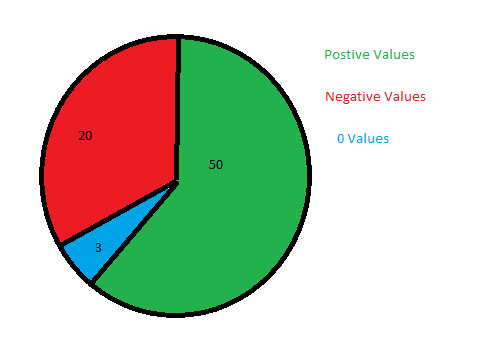
Pie Chart: Positive Values vs Negative Values

I have a Measured column that shows the variance between 2 columns..


Measure: Headcount vs Laptops Difference = LAPTOPS[Stock_Count_Measure] - Headcount[Headcount_Measure]
 
This coulmn will then contain either Negative, Positive or "0" values. 
 
Whats the best way to get a pie chart to count and display the number of Positive, Negative and "0" values.
Untitled.png
 
 
1 ACCEPTED SOLUTION

Hi @StuartSmith ,


You can do a caluclation as follows:

NegaticveCnt = CALCULATE(DISTINCTCOUNT(tablename[Country]), tablename[GroupCol] = "Negative")


Do similar measures for Positive and 0.


Thanks,

Pragati

Best Regards,

Pragati Jain


MVP logo


LinkedIn | Twitter | Blog YouTube 

Did I answer your question? Mark my post as a solution! This will help others on the forum!

Appreciate your Kudos!!

Proud to be a Super User!!

View solution in original post

4 REPLIES 4
Tahreem24
Super User
Super User

@StuartSmith ,
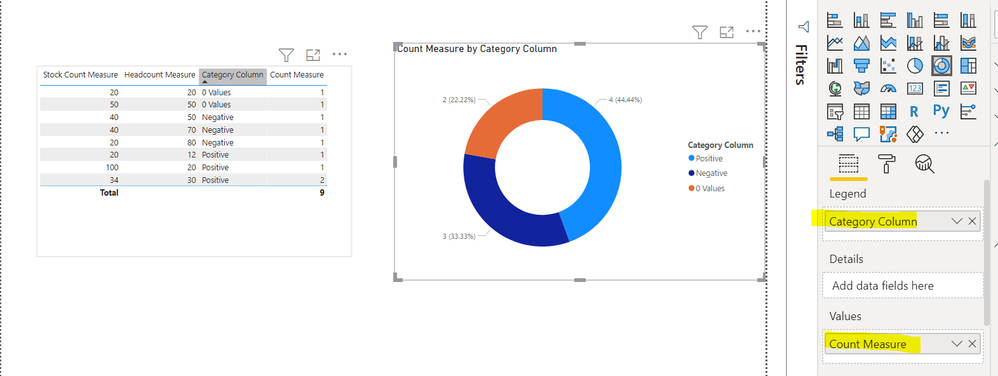
I replicated some sample at my end as per your deets.

SO create first one calculated column:

Category Column =
VAR Diff = TblName[Stock Count Measure] - TblName[Headcount Measure]
RETURN SWITCH(TRUE(),Diff>0,"Positive",
Diff<0,"Negative",
Diff=0,"0 Values")

Then create measure like below:
Count Measure = COUNT(TblName[Category Column])
Then you can put these on pie chart like the attached screen shot:
Capture.PNG
 
Don't forget to give thumbs up and accept this as a solution if it helped you!!!

Please take a quick glance at newly created dashboards : Restaurant Management Dashboard , HR Analytics Report , Hotel Management Report, Sales Analysis Report , Fortune 500 Companies Analysis , Revenue Tracking Dashboard
Pragati11
Super User
Super User

Hi @StuartSmith ,


You can try created a calculated column as follows to use on pie-chart:

GroupCalc = IF([Measure] = 0, "0 Values", IF([Measure] > 0, "Positive Values", "Negative Values"))


Replace [Measure] in above DAX with your measure/column.


Thanks,

Pragati

Best Regards,

Pragati Jain


MVP logo


LinkedIn | Twitter | Blog YouTube 

Did I answer your question? Mark my post as a solution! This will help others on the forum!

Appreciate your Kudos!!

Proud to be a Super User!!

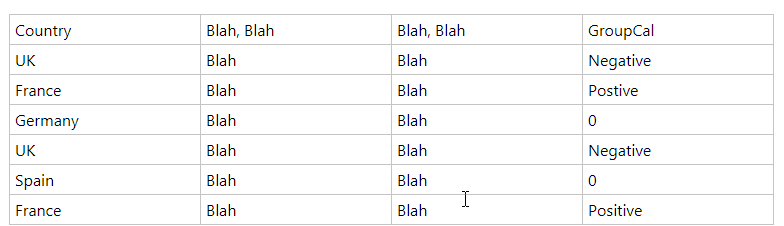
Thanks, your measure worked great, but then reaslied the result wasnt exactly what I wanted.  I now have a table similar to the below

2021-01-27_16-23-02.png


The chart is then conting each row, so Negative = 2, Positive = 2 & 0 = 1, but I realised that I need it to count each distinct country, so Negative = 1 (UK) , Positive = 1 (France) & 0 = 2 (Germany & Spain).


I am trying "DistinctCount" with your measure, but can figure it out.  Hope that makes sense.

Hi @StuartSmith ,


You can do a caluclation as follows:

NegaticveCnt = CALCULATE(DISTINCTCOUNT(tablename[Country]), tablename[GroupCol] = "Negative")


Do similar measures for Positive and 0.


Thanks,

Pragati

Best Regards,

Pragati Jain


MVP logo


LinkedIn | Twitter | Blog YouTube 

Did I answer your question? Mark my post as a solution! This will help others on the forum!

Appreciate your Kudos!!

Proud to be a Super User!!

Helpful resources

Announcements
Sticker Challenge 2026 Carousel

Join our Community Sticker Challenge 2026

If you love stickers, then you will definitely want to check out our Community Sticker Challenge!

January Power BI Update Carousel

Power BI Monthly Update - January 2026

Check out the January 2026 Power BI update to learn about new features.

FabCon Atlanta 2026 carousel

FabCon Atlanta 2026

Join us at FabCon Atlanta, March 16-20, for the ultimate Fabric, Power BI, AI and SQL community-led event. Save $200 with code FABCOMM.