
This is best Fabric, Power BI, SQL and AI community event. How do we know? The last event sold out! Save €200 with code FABCMTY200.
Register nowJuly 28 - August 9 | Final Round of the Power BI Dataviz World Championships. This is your chance. Learn more
Hello,
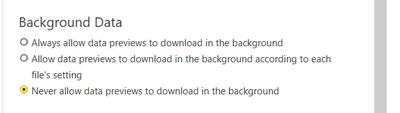
I have one question, For performance, what should I choose to make the report the fastest?
Solved! Go to Solution.
Preview data helps to present you with a quick preview of source data, and of transformation results for each step of your queries. It's stored separately on-disk and not inside the Power BI Desktop file. You'll achieve a faster refresh by setting the Power BI Desktop file to update the preview cache in the background.
Paul Zheng _ Community Support Team
If this post helps, please Accept it as the solution to help the other members find it more quickly.
https://www.thebiccountant.com/speedperformance-aspects/
I turn this off in general. It slows down many queries considerably. As you see, I’m also disabling almost everything else, as most if it can also have a negative impact on performance.
It's bette I choose this one :
Join us in Barcelona for FabCon and SQLCon, the Fabric, Power BI, SQL, and AI community event. Save €200 with code FABCMTY200.
If you love stickers, then you will definitely want to check out our community sticker challenge, Barcelona edition!
Check out the July 2026 Power BI update to learn about new features.
| User | Count |
|---|---|
| 25 | |
| 23 | |
| 19 | |
| 17 | |
| 14 |
| User | Count |
|---|---|
| 24 | |
| 20 | |
| 20 | |
| 19 | |
| 19 |