
Don't miss your chance to take exam DP-600 or DP-700 on us!
Request nowLearn from the best! Meet the four finalists headed to the FINALS of the Power BI Dataviz World Championships! Register now
Hello,
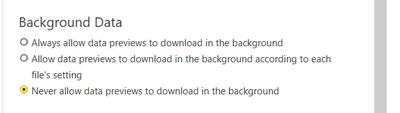
I have one question, For performance, what should I choose to make the report the fastest?
Solved! Go to Solution.
Preview data helps to present you with a quick preview of source data, and of transformation results for each step of your queries. It's stored separately on-disk and not inside the Power BI Desktop file. You'll achieve a faster refresh by setting the Power BI Desktop file to update the preview cache in the background.
Paul Zheng _ Community Support Team
If this post helps, please Accept it as the solution to help the other members find it more quickly.
https://www.thebiccountant.com/speedperformance-aspects/
I turn this off in general. It slows down many queries considerably. As you see, I’m also disabling almost everything else, as most if it can also have a negative impact on performance.
It's bette I choose this one :
Share feedback directly with Fabric product managers, participate in targeted research studies and influence the Fabric roadmap.
Check out the February 2026 Power BI update to learn about new features.
| User | Count |
|---|---|
| 54 | |
| 45 | |
| 38 | |
| 16 | |
| 15 |
| User | Count |
|---|---|
| 86 | |
| 70 | |
| 38 | |
| 29 | |
| 26 |