
cancel
Showing results for 
Search instead for 
Did you mean: 

Learn from the best! Meet the four finalists headed to the FINALS of the Power BI Dataviz World Championships! Register now

Reply
Vanessa250919
Helper V
Helper V

Performance report

Hello, 


I have one question, For performance, what should I choose to make the report the fastest? 


Vanessa250919_0-1621266149866.png


1 ACCEPTED SOLUTION

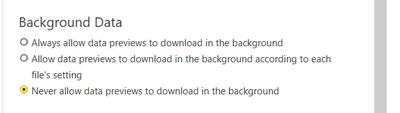
It's bette I choose this one :


Vanessa250919_0-1621266612122.png


View solution in original post

3 REPLIES 3
Anonymous
Not applicable

@Vanessa250919 


Preview data helps to present you with a quick preview of source data, and of transformation results for each step of your queries. It's stored separately on-disk and not inside the Power BI Desktop file. You'll achieve a faster refresh by setting the Power BI Desktop file to update the preview cache in the background.


Paul Zheng _ Community Support Team
If this post helps, please Accept it as the solution to help the other members find it more quickly.

Anonymous
Not applicable

https://www.thebiccountant.com/speedperformance-aspects/


I turn this off in general. It slows down many queries considerably. As you see, I’m also disabling almost everything else, as most if it can also have a negative impact on performance.

It's bette I choose this one :


Vanessa250919_0-1621266612122.png


Helpful resources

Announcements
Join our Fabric User Panel

Join our Fabric User Panel

Share feedback directly with Fabric product managers, participate in targeted research studies and influence the Fabric roadmap.

February Power BI Update Carousel

Power BI Monthly Update - February 2026

Check out the February 2026 Power BI update to learn about new features.

FabCon Atlanta 2026 carousel

FabCon Atlanta 2026

Join us at FabCon Atlanta, March 16-20, for the ultimate Fabric, Power BI, AI and SQL community-led event. Save $200 with code FABCOMM.