Get certified for free when you join Fabric Data Days 2026 and dive into Fabric, Power BI, SQL, AI, and other essential data skills.
Join nowData Days is here! Join us now for 60+ days of learning, challenges, and connection. Learn more
Hi,
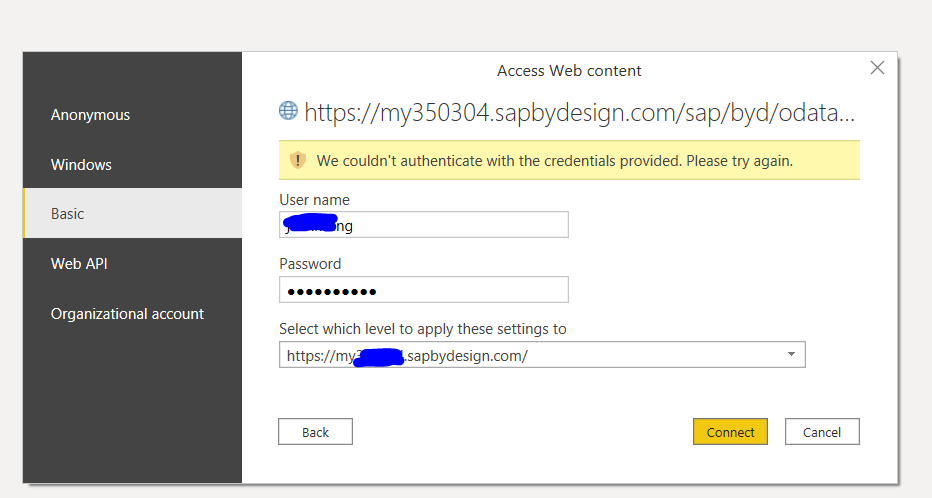
I am trying to import data into power bi using Odata. I have tested the url and credentials in web broswer which works well.
But in Power BI, the credential always fails. I have use both Odata feed and Web import mode, none of them works.
Solved! Go to Solution.
Hey @Jeanxyz ,
could you check the blog post I proposed?
I'm curious if you could solve this issue 🙂
Hi Denis,
Thank you so much for the post. I have followed the same Odata procedure as described in the post. We don't have single sign-on set up in SAP. So I'm not quite sure why it doens't work. I will check with a SAP specialist to figure out the reason.
Regards,
Jean
Hey @Jeanxyz ,
there are a few things you have to consider when you try to connect to SAP ByDesign OData. For example if you are using single sign on you have to add saml2=disabled as a parameter to the URL etc.
Check the following blog post on how to connect in Power Query:
Using SAP ByDesign OData in Microsoft Power Query | SAP Blogs
As an alternative there is also a connector for SAP ByDesign:
SAP ByDesign Power BI Connector - CData Software
Hey @Jeanxyz ,
could you check the blog post I proposed?
I'm curious if you could solve this issue 🙂
Don't miss out on Data Days, June 15 through August 7. Learn Fabric, Power BI, SQL, AI and more.
Check out the May 2026 Power BI update to learn about new features.
| User | Count |
|---|---|
| 23 | |
| 21 | |
| 20 | |
| 19 | |
| 13 |
| User | Count |
|---|---|
| 58 | |
| 50 | |
| 38 | |
| 31 | |
| 27 |