Get certified for free when you join Fabric Data Days 2026 and dive into Fabric, Power BI, SQL, AI, and other essential data skills.
Join nowJuly 7 - July 17 | Round 2 of the Power BI Dataviz World Championships. Don't miss your chance! Learn more
Hi,
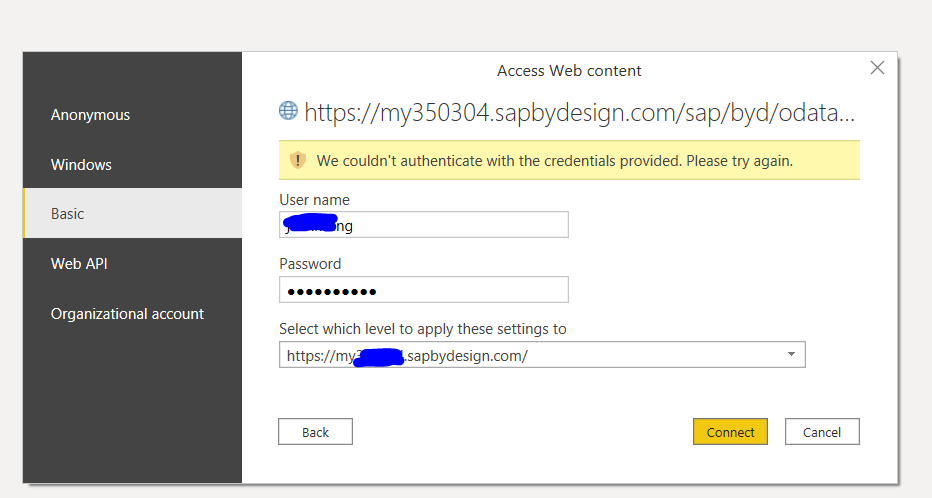
I am trying to import data into power bi using Odata. I have tested the url and credentials in web broswer which works well.
But in Power BI, the credential always fails. I have use both Odata feed and Web import mode, none of them works.
Solved! Go to Solution.
Hey @Jeanxyz ,
could you check the blog post I proposed?
I'm curious if you could solve this issue 🙂
Hi Denis,
Thank you so much for the post. I have followed the same Odata procedure as described in the post. We don't have single sign-on set up in SAP. So I'm not quite sure why it doens't work. I will check with a SAP specialist to figure out the reason.
Regards,
Jean
Hey @Jeanxyz ,
there are a few things you have to consider when you try to connect to SAP ByDesign OData. For example if you are using single sign on you have to add saml2=disabled as a parameter to the URL etc.
Check the following blog post on how to connect in Power Query:
Using SAP ByDesign OData in Microsoft Power Query | SAP Blogs
As an alternative there is also a connector for SAP ByDesign:
SAP ByDesign Power BI Connector - CData Software
Hey @Jeanxyz ,
could you check the blog post I proposed?
I'm curious if you could solve this issue 🙂
Join us in Barcelona for FabCon and SQLCon, the Fabric, Power BI, SQL, and AI community event. Save €200 with code FABCMTY200.
Join Data Days 2026: 60 days of free live/on-demand sessions, challenges, study groups, and certification opportunities.
| User | Count |
|---|---|
| 29 | |
| 27 | |
| 24 | |
| 24 | |
| 18 |
| User | Count |
|---|---|
| 54 | |
| 50 | |
| 41 | |
| 33 | |
| 23 |