This is best Fabric, Power BI, SQL and AI community event. How do we know? The last event sold out! Save €200 with code FABCMTY200.
Register nowA new Data Days event is coming soon! This time we’re going bigger than ever. Fabric, Power BI, SQL, AI and more. Don't miss out.
Hi,
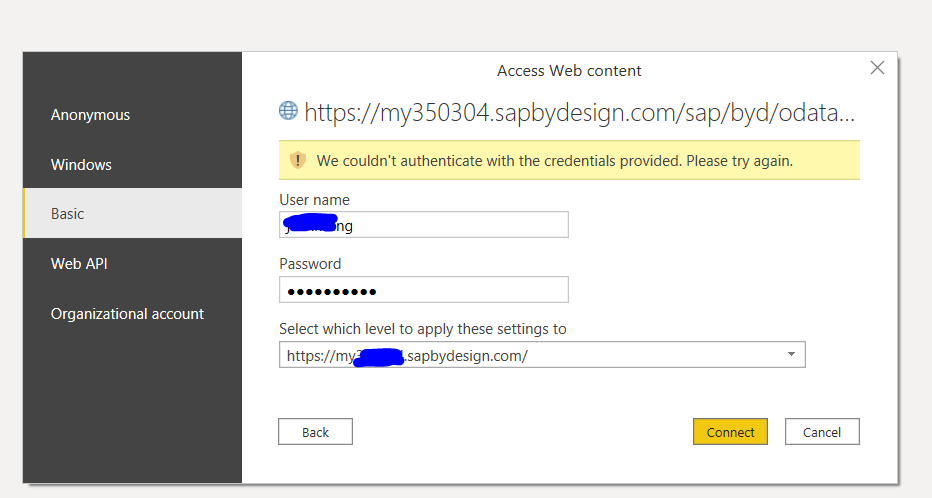
I am trying to import data into power bi using Odata. I have tested the url and credentials in web broswer which works well.
But in Power BI, the credential always fails. I have use both Odata feed and Web import mode, none of them works.
Solved! Go to Solution.
Hey @Jeanxyz ,
could you check the blog post I proposed?
I'm curious if you could solve this issue 🙂
Hi Denis,
Thank you so much for the post. I have followed the same Odata procedure as described in the post. We don't have single sign-on set up in SAP. So I'm not quite sure why it doens't work. I will check with a SAP specialist to figure out the reason.
Regards,
Jean
Hey @Jeanxyz ,
there are a few things you have to consider when you try to connect to SAP ByDesign OData. For example if you are using single sign on you have to add saml2=disabled as a parameter to the URL etc.
Check the following blog post on how to connect in Power Query:
Using SAP ByDesign OData in Microsoft Power Query | SAP Blogs
As an alternative there is also a connector for SAP ByDesign:
SAP ByDesign Power BI Connector - CData Software
Hey @Jeanxyz ,
could you check the blog post I proposed?
I'm curious if you could solve this issue 🙂
Check out the May 2026 Power BI update to learn about new features.
Sign up to receive a private message when registration opens and key events begin.
If you have recently started exploring Fabric, we'd love to hear how it's going. Your feedback can help with product improvements.
| User | Count |
|---|---|
| 32 | |
| 26 | |
| 25 | |
| 24 | |
| 15 |
| User | Count |
|---|---|
| 62 | |
| 48 | |
| 27 | |
| 21 | |
| 20 |