
cancel
Showing results for 
Search instead for 
Did you mean: 

A new Data Days event is coming soon! This time we’re going bigger than ever. Fabric, Power BI, SQL, AI and more. Don't miss out.

Reply
jimmyswoosh
Advocate I
Advocate I

Need Help With Parsing JSON/DataBag Format

Hi Power BI Community!
 
I'm in need of help on how to parse a column with string value in a JSON/DataBag structure. Normally I would use the auto splitter that's present at the column headers but since the data isn't a record or list, this option isn't available.
 
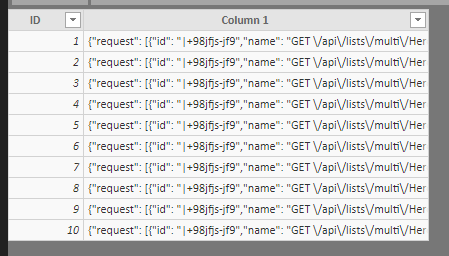
Here's the sample dataset of what I'm starting with
 
Starting DataStarting Data
Here's what I'm trying to get to
 
Expected ResultsExpected Results
 
JSON/DataBag Prettified
 
{
  "request": [
    {
      "id": "|+98jfjs-jf9",
      "name": "GET /api/lists/multi/HeroList",
      "count": 1000,
      "responseCode": 200,
      "success": true,
      "url": "https://example.com/api/lists/multi/HeroList?locale=en-us",
      "urlData": {
        "base": "/api/lists/multi/HeroList",
        "host": "example.com",
        "hashTag": "",
        "protocol": "https"
      },
      "durationMetric": {
        "value": 50922000,
        "count": 1000,
        "min": 50922,
        "max": 50922,
        "stdDev": 0,
        "sampledValue": 50922
      }
    }
  ],
  "internal": {
    "data": {
      "id": "546g456-gdfg335g-453reh45g",
      "documentVersion": "1.61"
    }
  },
  "context": {
    "data": {
      "eventTime": "2018-11-28T15:55:42.228548Z",
      "isSynthetic": false,
      "samplingRate": 0.1
    },
    "cloud": {},
    "device": {
      "type": "PC",
      "roleName": "admin",
      "roleInstance": "FSLDFJ3485345J",
      "screenResolution": {}
    },
    "user": {
      "anonId": "GHG890",
      "isAuthenticated": false
    },
    "session": {
      "id": "NJF98fj",
      "isFirst": false
    },
    "operation": {
      "id": "+78FJI",
      "parentId": "|+5myn.QNAGN",
      "name": "GET /api/lists/multi/HeroList"
    },
    "location": {
      "clientip": "0.0.0.0",
      "continent": "North America",
      "country": "United States"
    },
    "custom": {
      "dimensions": [
        {
          "_test.ProcessedByMetricExtractors": "(Name:'Requests', Ver:'1.0')"
        },
        {
          "client-ip": "00.00.000.00"
        }
      ]
    }
  }
}
 
Thanks,
-James
1 ACCEPTED SOLUTION
v-lili6-msft
Community Support
Community Support

hi, @jimmyswoosh

After my test, you may try this way as below:
Step1:

Select column 1 then click Add column->From text->Parse->Json

Step2:

Expand JSON.request

201811291

 Step3:

Expand other columns

If there are list in the column, Expand to New Rows, then Expand column.


Best Regards,

Lin

Community Support Team _ Lin
If this post helps, then please consider Accept it as the solution to help the other members find it more quickly.

View solution in original post

3 REPLIES 3
v-lili6-msft
Community Support
Community Support

hi, @jimmyswoosh

After my test, you may try this way as below:
Step1:

Select column 1 then click Add column->From text->Parse->Json

Step2:

Expand JSON.request

201811291

 Step3:

Expand other columns

If there are list in the column, Expand to New Rows, then Expand column.


Best Regards,

Lin

Community Support Team _ Lin
If this post helps, then please consider Accept it as the solution to help the other members find it more quickly.

Thanks @v-lili6-msft!


I'll give this a try


-James

That did the trick, thanks!


-James

Helpful resources

Announcements
May Power BI Update Carousel

Power BI Monthly Update - May 2026

Check out the May 2026 Power BI update to learn about new features.

Fabric SQL PBI Data Days

Data Days 2026 coming soon!

Sign up to receive a private message when registration opens and key events begin.

New to Fabric survey Carousel

New to Fabric Survey

If you have recently started exploring Fabric, we'd love to hear how it's going. Your feedback can help with product improvements.

Power BI DataViz World Championships carousel

Power BI DataViz World Championships - June 2026

A new Power BI DataViz World Championship is coming this June! Don't miss out on submitting your entry.