
Get certified for free when you join Fabric Data Days 2026 and dive into Fabric, Power BI, SQL, AI, and other essential data skills.
Join nowData Days is here! Join us now for 60+ days of learning, challenges, and connection. Learn more
Hello,
I've encountered a problem when writing a DAX measure.
My design:
- A fact table
- A Date dimension (granularity: day)
- A Time dimension (it has Hour integers and Minute integers - only for quarters (0, 15, 30, 45)
What I want to achieve:
- Force Tabular to always AVERAGE my measure from 15-minute intervals to an hour.
- Force Tabular to always SUM the averages from first bullet.
- This has to work even when Time/Date dimensions aren't used in the pivot table/PBI.
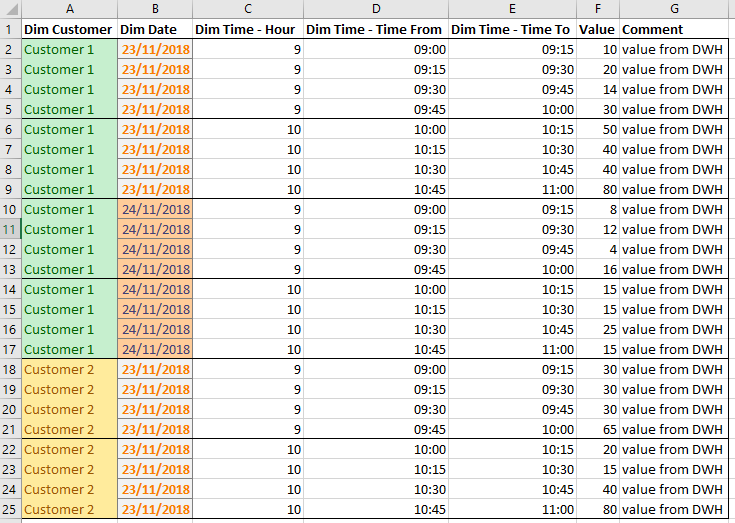
Let's suppose this is how data at the lowest granularity looks like (there are more dimensions, though):
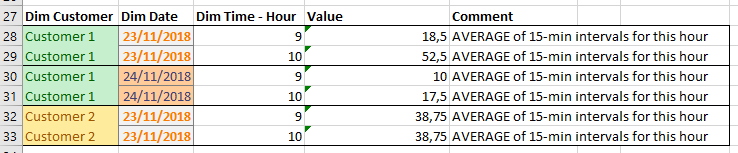
This is how it should look like one level higher - no more minutes:
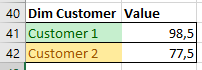
This is how it should look like if we remove Time dimension:
And if I remove the Date dimension:
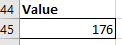
And If I don't use any dimensions:
Can anyone help me?How to achieve this in DAX?
Thanks in advance.
Solved! Go to Solution.
Hi @Anonymous
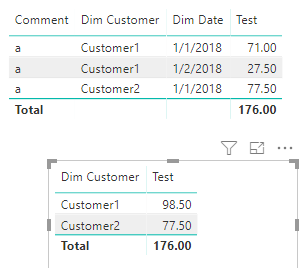
You may try below measure:
Test =
SUMX (
SUMMARIZE (
Table1,
Table1[Dim Customer],
Table1[Dim Date],
Table1[Dim Time-Hour]
),
SUM ( Table1[Value] ) / COUNT ( Table1[Dim Time-Hour] )
)
Regards,
Cherie
Hi @Anonymous
You may try below measure:
Test =
SUMX (
SUMMARIZE (
Table1,
Table1[Dim Customer],
Table1[Dim Date],
Table1[Dim Time-Hour]
),
SUM ( Table1[Value] ) / COUNT ( Table1[Dim Time-Hour] )
)
Regards,
Cherie
Don't miss out on Data Days, June 15 through August 7. Learn Fabric, Power BI, SQL, AI and more.
Check out the May 2026 Power BI update to learn about new features.
| User | Count |
|---|---|
| 22 | |
| 21 | |
| 20 | |
| 17 | |
| 13 |
| User | Count |
|---|---|
| 58 | |
| 50 | |
| 37 | |
| 29 | |
| 24 |