
cancel
Showing results for 
Search instead for 
Did you mean: 

July 7 - July 17 | Round 2 of the Power BI Dataviz World Championships. Don't miss your chance! Learn more

Reply
Anonymous
Not applicable

Multi-level aggregation using DAX

Hello,


I've encountered a problem when writing a DAX measure.


My design:
- A fact table

- A Date dimension (granularity: day)

- A Time dimension (it has Hour integers and Minute integers - only for quarters (0, 15, 30, 45)


What I want to achieve:

- Force Tabular to always AVERAGE my measure from 15-minute intervals to an hour.

- Force Tabular to always SUM the averages from first bullet.

- This has to work even when Time/Date dimensions aren't used in the pivot table/PBI.


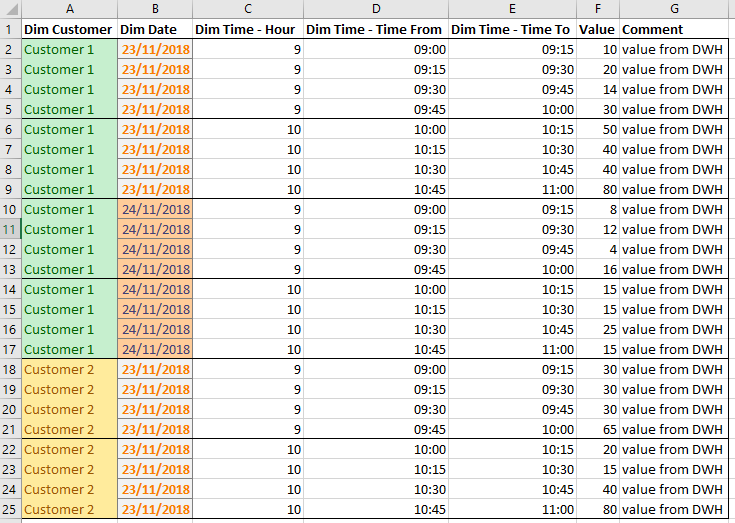
Let's suppose this is how data at the lowest granularity looks like (there are more dimensions, though):

lowest granularity.PNG


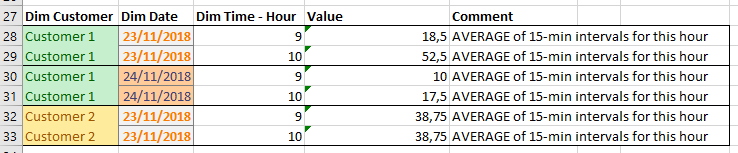
This is how it should look like one level higher - no more minutes:

hourly granularity.PNG


This is how it should look like if we remove Time dimension:

daily granularity.PNG


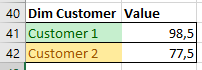
And if I remove the Date dimension:

customer granularity.PNG


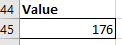
And If I don't use any dimensions:

highest granularity.PNG


Can anyone help me?How to achieve this in DAX?


Thanks in advance.

1 ACCEPTED SOLUTION
v-cherch-msft
Microsoft Employee
Microsoft Employee

Hi @Anonymous


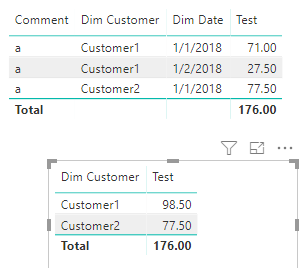
You may try below measure:

Test =
SUMX (
    SUMMARIZE (
        Table1,
        Table1[Dim Customer],
        Table1[Dim Date],
        Table1[Dim Time-Hour]
    ),
    SUM ( Table1[Value] ) / COUNT ( Table1[Dim Time-Hour] )
)

1.png


Regards,

Cherie

Community Support Team _ Cherie Chen
If this post helps, then please consider Accept it as the solution to help the other members find it more quickly.

View solution in original post

2 REPLIES 2
v-cherch-msft
Microsoft Employee
Microsoft Employee

Hi @Anonymous


You may try below measure:

Test =
SUMX (
    SUMMARIZE (
        Table1,
        Table1[Dim Customer],
        Table1[Dim Date],
        Table1[Dim Time-Hour]
    ),
    SUM ( Table1[Value] ) / COUNT ( Table1[Dim Time-Hour] )
)

1.png


Regards,

Cherie

Community Support Team _ Cherie Chen
If this post helps, then please consider Accept it as the solution to help the other members find it more quickly.
GilbertQ
Super User
Super User

Hi there

What measures have you tried to do to get this working?


Did I answer your question? Mark my post as a solution!

Proud to be a Super User!


Power BI Blog

Helpful resources

Announcements
FabCon and SQLCon Barcelona 2026

FabCon & SQLCon – Barcelona 2026

Join us in Barcelona for FabCon and SQLCon, the Fabric, Power BI, SQL, and AI community event. Save €200 with code FABCMTY200.

60 days of Data Days Carousel

Data Days 2026

Join Fabric Data Days 2026: 60 days of free live/on-demand sessions, challenges, study groups, and certification opportunities.

Power BI DataViz World Championships carousel

Power BI DataViz World Championships - June 2026

A new Power BI DataViz World Championship is coming this June! Don't miss out on submitting your entry.