
This is best Fabric, Power BI, SQL and AI community event. How do we know? The last event sold out! Save €200 with code FABCMTY200.
Register nowA new Data Days event is coming soon! This time we’re going bigger than ever. Fabric, Power BI, SQL, AI and more. Don't miss out.
Hello,
I've encountered a problem when writing a DAX measure.
My design:
- A fact table
- A Date dimension (granularity: day)
- A Time dimension (it has Hour integers and Minute integers - only for quarters (0, 15, 30, 45)
What I want to achieve:
- Force Tabular to always AVERAGE my measure from 15-minute intervals to an hour.
- Force Tabular to always SUM the averages from first bullet.
- This has to work even when Time/Date dimensions aren't used in the pivot table/PBI.
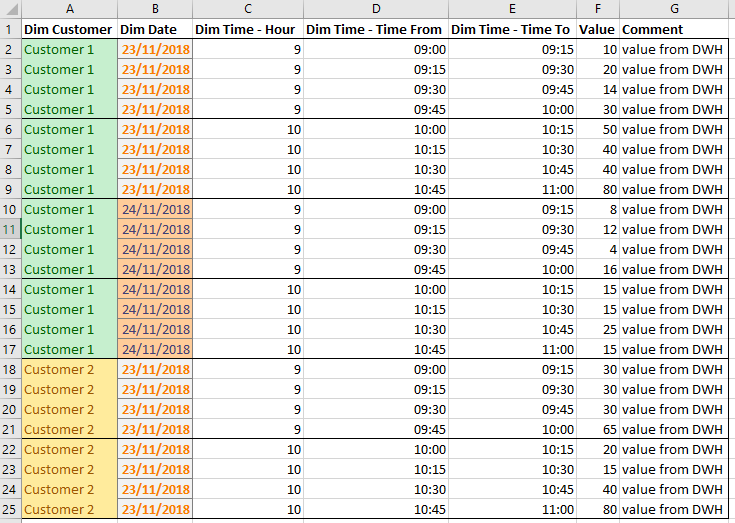
Let's suppose this is how data at the lowest granularity looks like (there are more dimensions, though):
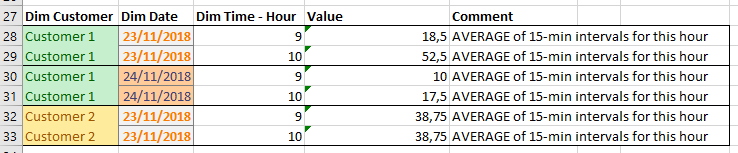
This is how it should look like one level higher - no more minutes:
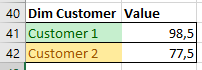
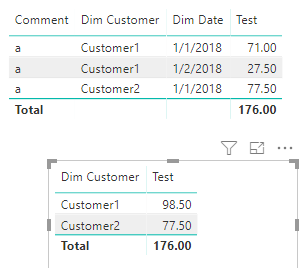
This is how it should look like if we remove Time dimension:
And if I remove the Date dimension:
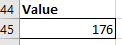
And If I don't use any dimensions:
Can anyone help me?How to achieve this in DAX?
Thanks in advance.
Solved! Go to Solution.
Hi @Anonymous
You may try below measure:
Test =
SUMX (
SUMMARIZE (
Table1,
Table1[Dim Customer],
Table1[Dim Date],
Table1[Dim Time-Hour]
),
SUM ( Table1[Value] ) / COUNT ( Table1[Dim Time-Hour] )
)
Regards,
Cherie
Hi @Anonymous
You may try below measure:
Test =
SUMX (
SUMMARIZE (
Table1,
Table1[Dim Customer],
Table1[Dim Date],
Table1[Dim Time-Hour]
),
SUM ( Table1[Value] ) / COUNT ( Table1[Dim Time-Hour] )
)
Regards,
Cherie
Check out the May 2026 Power BI update to learn about new features.
Sign up to receive a private message when registration opens and key events begin.
If you have recently started exploring Fabric, we'd love to hear how it's going. Your feedback can help with product improvements.
| User | Count |
|---|---|
| 32 | |
| 25 | |
| 23 | |
| 22 | |
| 13 |
| User | Count |
|---|---|
| 61 | |
| 47 | |
| 27 | |
| 24 | |
| 19 |