cancel
Showing results for 
Search instead for 
Did you mean: 

July 7 - July 17 | Round 2 of the Power BI Dataviz World Championships. Don't miss your chance! Learn more

Reply
abelrmg
Helper II
Helper II

Merge rows

Hi,


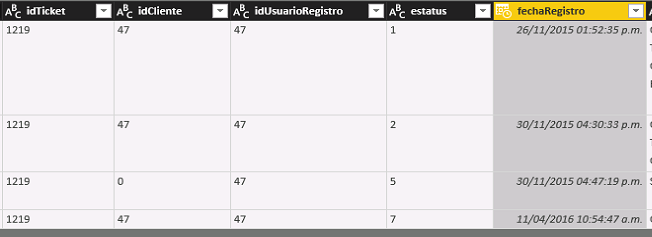
I have this data

POWERBI.PNG


How can i merge de rows and obtain one row with this structure:

idticketfecharegistro1fecharegistro2fecharegistro5fecharegistro7
121926/11/201530/11/201530/11/201511/04/2016


in according with the "estatus"


Regards

1 ACCEPTED SOLUTION

@abelrmg


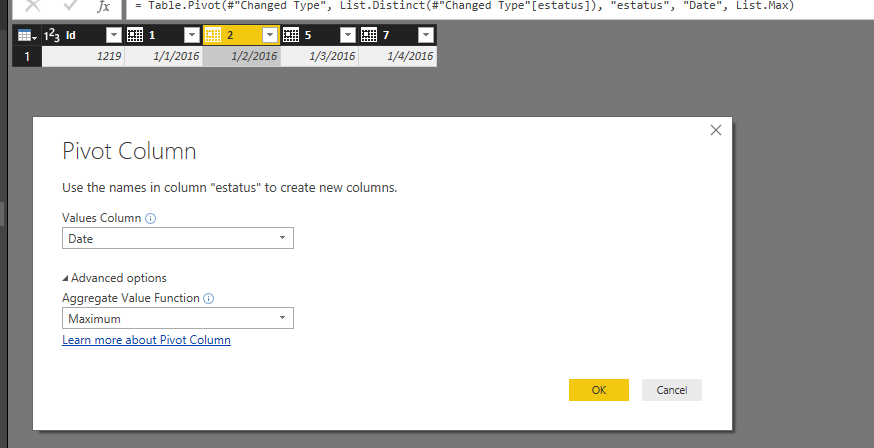
You just need to create a custom column to append "Date" with estatus, then directly pivot on that column. See my sample below:


Capture.PNG


Regards,

View solution in original post

6 REPLIES 6
Anonymous
Not applicable

I would first consider why you want to do this.  You can get to that format with your Power BI visuals, but leaving the data unpivoted gives you the greatest flexibility.

Hi @Anonymous, i want to do this because i will calculate time between dates.


Anonymous
Not applicable

Still easy to do in the current format.  Create some sort of index marker and do your calculations.

Agree with @Anonymous


Should you still want to go ahead, then it can be done with Power Query (M). The following code was created via standard menu options; the last step with advanced option "Don't Aggregate".


let
    Source = Table1,
    #"Removed Columns" = Table.RemoveColumns(Source,{"idCliente", "idUsuarioRegistro"}),
    #"Added Prefix" = Table.TransformColumns(#"Removed Columns", {{"estatus", each "fecharegistro" & _, type text}}),
    #"Changed Type" = Table.TransformColumnTypes(#"Added Prefix",{{"fechaRegistro", type date}}),
    #"Pivoted Column" = Table.Pivot(#"Changed Type", List.Distinct(#"Changed Type"[estatus]), "estatus", "fechaRegistro")
in
    #"Pivoted Column"
Specializing in Power Query Formula Language (M)

Hi @MarcelBeug the query send this error


Expression.Error: The column 'idCliente' of the table wasn't found.
Details:
idCliente


Regards

@abelrmg


You just need to create a custom column to append "Date" with estatus, then directly pivot on that column. See my sample below:


Capture.PNG


Regards,

Helpful resources

Announcements
FabCon and SQLCon Barcelona 2026

FabCon & SQLCon – Barcelona 2026

Join us in Barcelona for FabCon and SQLCon, the Fabric, Power BI, SQL, and AI community event. Save €200 with code FABCMTY200.

60 days of Data Days Carousel

Data Days 2026

Join Fabric Data Days 2026: 60 days of free live/on-demand sessions, challenges, study groups, and certification opportunities.

Power BI DataViz World Championships carousel

Power BI DataViz World Championships - June 2026

A new Power BI DataViz World Championship is coming this June! Don't miss out on submitting your entry.