This time we’re going bigger than ever. Fabric, Power BI, SQL, AI and more. We're covering it all. You won't want to miss it.
Learn moreDid you hear? There's a new SQL AI Developer certification (DP-800). Start preparing now and be one of the first to get certified. Register now
Hi,
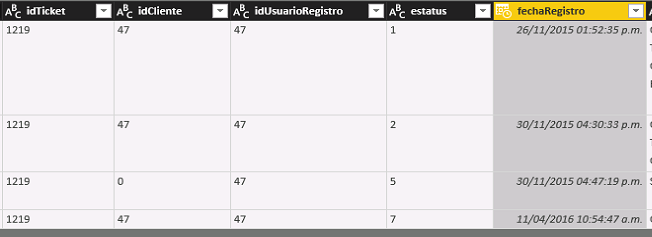
I have this data
How can i merge de rows and obtain one row with this structure:
| idticket | fecharegistro1 | fecharegistro2 | fecharegistro5 | fecharegistro7 |
| 1219 | 26/11/2015 | 30/11/2015 | 30/11/2015 | 11/04/2016 |
in according with the "estatus"
Regards
Solved! Go to Solution.
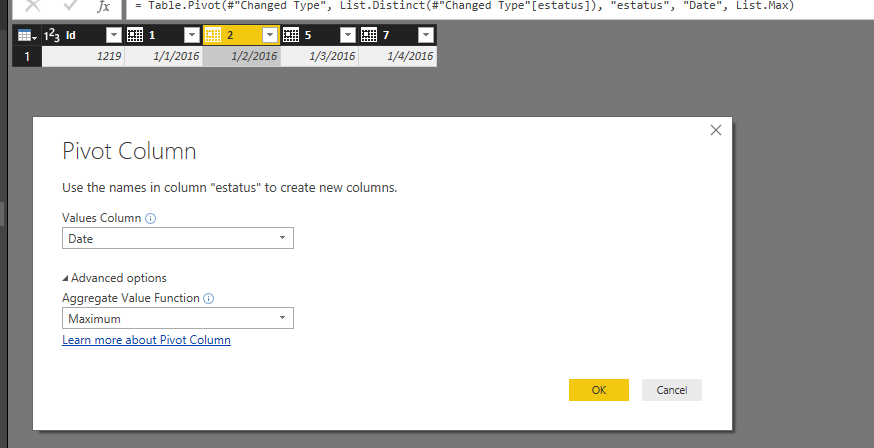
You just need to create a custom column to append "Date" with estatus, then directly pivot on that column. See my sample below:
Regards,
I would first consider why you want to do this. You can get to that format with your Power BI visuals, but leaving the data unpivoted gives you the greatest flexibility.
Hi @Anonymous, i want to do this because i will calculate time between dates.
Still easy to do in the current format. Create some sort of index marker and do your calculations.
Agree with @Anonymous
Should you still want to go ahead, then it can be done with Power Query (M). The following code was created via standard menu options; the last step with advanced option "Don't Aggregate".
let
Source = Table1,
#"Removed Columns" = Table.RemoveColumns(Source,{"idCliente", "idUsuarioRegistro"}),
#"Added Prefix" = Table.TransformColumns(#"Removed Columns", {{"estatus", each "fecharegistro" & _, type text}}),
#"Changed Type" = Table.TransformColumnTypes(#"Added Prefix",{{"fechaRegistro", type date}}),
#"Pivoted Column" = Table.Pivot(#"Changed Type", List.Distinct(#"Changed Type"[estatus]), "estatus", "fechaRegistro")
in
#"Pivoted Column"
Hi @MarcelBeug the query send this error
Expression.Error: The column 'idCliente' of the table wasn't found.
Details:
idCliente
Regards
You just need to create a custom column to append "Date" with estatus, then directly pivot on that column. See my sample below:
Regards,
Check out the April 2026 Power BI update to learn about new features.
Sign up to receive a private message when registration opens and key events begin.
If you have recently started exploring Fabric, we'd love to hear how it's going. Your feedback can help with product improvements.
| User | Count |
|---|---|
| 36 | |
| 33 | |
| 31 | |
| 21 | |
| 16 |
| User | Count |
|---|---|
| 65 | |
| 53 | |
| 31 | |
| 23 | |
| 23 |