We've captured the moments from FabCon & SQLCon that everyone is talking about, and we are bringing them to the community, live and on-demand. Starts on April 14th. Register now
Hello All,
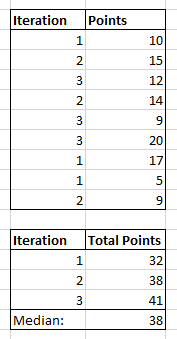
I have a table which has iteration and points covered in each iteration as shown below. I need to group the table as shown in figure 2. The second table contains distinct iterations and total points covered in that iteration. I have calculated the median and percent(Divided total points of each iteration by the median calculated) as follows:
Media =
MEDIANX (
SUMMARIZE ( Data, Data[Iteration] ),
CALCULATE ( SUM ( Data[Points] ) )
)Percent = DIVIDE ( SUM ( Data[Points] ), CALCULATE ( [Media], ALLSELECTED ( Data ) ) )
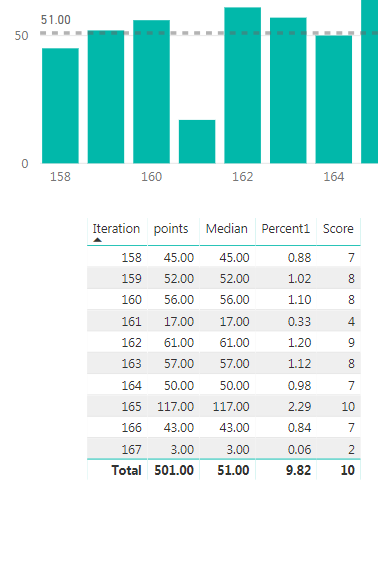
In my actual table there are many iterations and I need to display the top 6 iterations and get the score for them. The above calculation works if ALL(Data) is used instead of ALLSELECTED(Data). However, in my graph visualization(Custom Column Chart), upon selecting a particular iteration,the value of percent changes to 1 for all iterations.
Hoping you could help out here.
Thanks,
Prashasti
Hi @Prashasti,
Actually, current you can use table/matrix visual to 'highlight' interaction with other charts.(it seems like power bi not support to use other visual to highlight table/matrix visuals records)
Regards,
Xiaoxin Sheng
Hi @Prashasti
I'm not sure I understand the issue correctly but, isn't that what you would expect? If you select one of the iterations, the ALLSELECTED() in the denominator of your [Percent] measure restricts the [media] measure to only the selected iteration. Therefore [Percent] is 100%, since numerator and denominator yield the same.
What result were you expecting? What would you like to see when selecting only one iteration?
Hi @AlB,
I need the percent to remain 0.33 as I'm using this to calculate a measure. I'm then using this measure to get the average with other measures. But When I filter based on iterations, the percent here changes, thereby resulting in a wrong score. I need to know if there's an alternative to AllSelected() or can I create a copy of this table which only has the top 10 values of iterations so that I can use All() on this copy of the table to get the expected result.
Hope this makes the issue clear.
Thanks,
Prashasti
Hi @Prashasti
I'm still not very clear but if you need all the iterations to be taken into account in the denominator of [Percent] then you should use ALL() instead of ALLSELECTED()
If you have recently started exploring Fabric, we'd love to hear how it's going. Your feedback can help with product improvements.
A new Power BI DataViz World Championship is coming this June! Don't miss out on submitting your entry.
Share feedback directly with Fabric product managers, participate in targeted research studies and influence the Fabric roadmap.
| User | Count |
|---|---|
| 57 | |
| 38 | |
| 33 | |
| 19 | |
| 16 |
| User | Count |
|---|---|
| 67 | |
| 66 | |
| 40 | |
| 34 | |
| 25 |