Join us at FabCon Atlanta from March 16 - 20, 2026, for the ultimate Fabric, Power BI, AI and SQL community-led event. Save $200 with code FABCOMM.
Register now!Get Fabric Certified for FREE during Fabric Data Days. Don't miss your chance! Request now
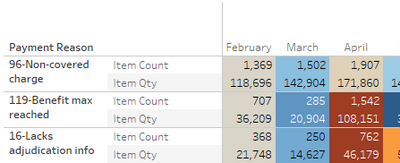
I'm relatively new to PowerBI but pretty fluent in Tableau. Is there a way of splitting different numeric values onto rows over time like this:
Solved! Go to Solution.
In the settings area for "Values" enable the toggle "Show on rows"
in the Values area of the visual you can click the dropdown next to the measure and "Rename for this visual"
Thank you so much! That was exactly what I needed.
Sorry for the followup but how do I change the title of the column titles? Where I might see "Sum of Revenue" and "Count of Sales Orders"
in the Values area of the visual you can click the dropdown next to the measure and "Rename for this visual"
Thanks again! Hey, I have a value that I want to format with commas. I highlighted the field in the Data tab and formatted with the format tab. When the value enters the viz as a SUM, the formatting is correct but when I change the value to a Distinct Count I lose formatting. Any idea how to fix it?
a distinct count with commas? really? What locale uses that?
Anyway , read about the FORMAT DAX function.
In the settings area for "Values" enable the toggle "Show on rows"
Check out the November 2025 Power BI update to learn about new features.
Advance your Data & AI career with 50 days of live learning, contests, hands-on challenges, study groups & certifications and more!