Get certified for free when you join Fabric Data Days 2026 and dive into Fabric, Power BI, SQL, AI, and other essential data skills.
Join nowJuly 28 - August 9 | Final Round of the Power BI Dataviz World Championships. This is your chance. Learn more
Solved! Go to Solution.
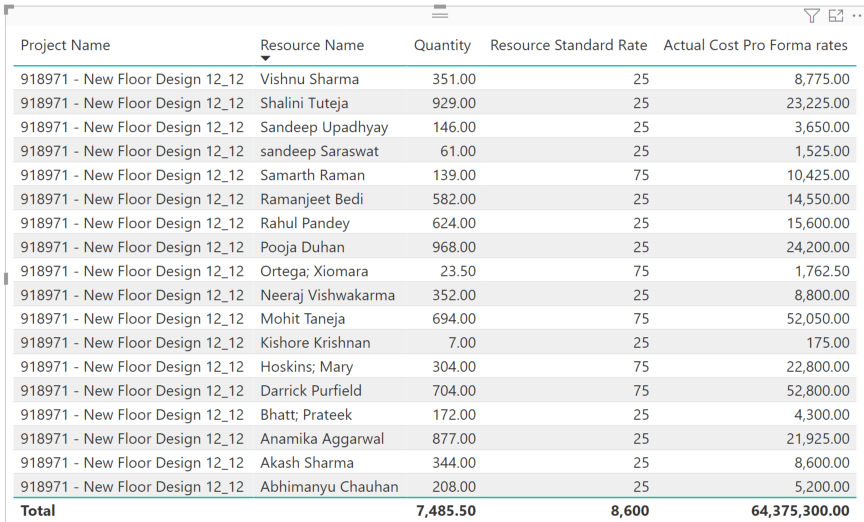
This looks like a measure totals problem. Very common. See my post about it here: https://community.powerbi.com/t5/DAX-Commands-and-Tips/Dealing-with-Measure-Totals/td-p/63376
Also, this Quick Measure, Measure Totals, The Final Word should get you what you need:
https://community.powerbi.com/t5/Quick-Measures-Gallery/Measure-Totals-The-Final-Word/m-p/547907
Try Like
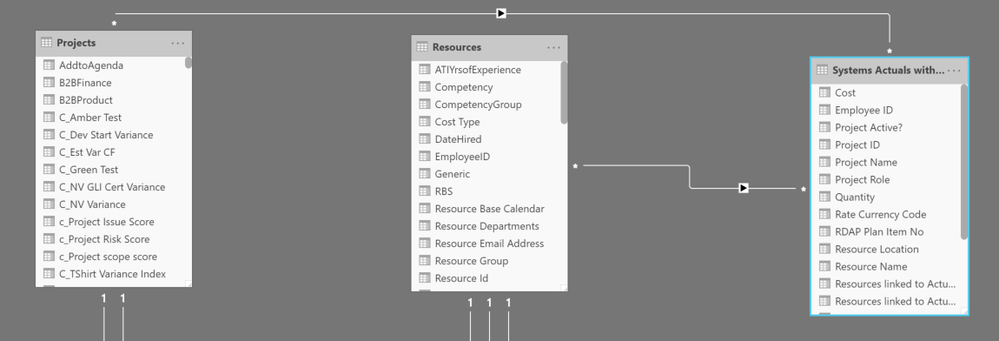
SUMX(Summarize('Systems Actuals with Teams','Systems Actuals with Teams'[Project Name]
,"_1",[Quantity],"_2",SUMX('Resources',[Resource Standard Rate])),[_1]*[_2])
Row context need to set
Hi @amitchandak ,
I appreciate the quick response. I am trying to use the DAX you provided but running into Syntax issues. Where you have [Quantity] after the _1, DAX will not allow me to use the Quantity column as specified.
This looks like a measure totals problem. Very common. See my post about it here: https://community.powerbi.com/t5/DAX-Commands-and-Tips/Dealing-with-Measure-Totals/td-p/63376
Also, this Quick Measure, Measure Totals, The Final Word should get you what you need:
https://community.powerbi.com/t5/Quick-Measures-Gallery/Measure-Totals-The-Final-Word/m-p/547907
Hi @Greg_Deckler ,
Join us in Barcelona for FabCon and SQLCon, the Fabric, Power BI, SQL, and AI community event. Save €200 with code FABCMTY200.
If you love stickers, then you will definitely want to check out our community sticker challenge, Barcelona edition!
Check out the July 2026 Power BI update to learn about new features.
| User | Count |
|---|---|
| 26 | |
| 24 | |
| 23 | |
| 19 | |
| 17 |
| User | Count |
|---|---|
| 30 | |
| 28 | |
| 20 | |
| 20 | |
| 19 |