Join us at FabCon Atlanta from March 16 - 20, 2026, for the ultimate Fabric, Power BI, AI and SQL community-led event. Save $200 with code FABCOMM.
Register now!The Power BI Data Visualization World Championships is back! It's time to submit your entry. Live now!
Solved! Go to Solution.
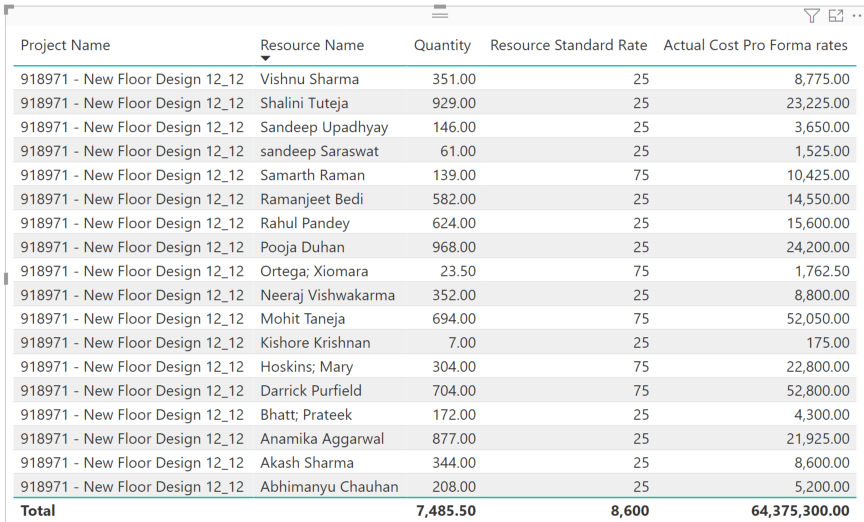
This looks like a measure totals problem. Very common. See my post about it here: https://community.powerbi.com/t5/DAX-Commands-and-Tips/Dealing-with-Measure-Totals/td-p/63376
Also, this Quick Measure, Measure Totals, The Final Word should get you what you need:
https://community.powerbi.com/t5/Quick-Measures-Gallery/Measure-Totals-The-Final-Word/m-p/547907
Try Like
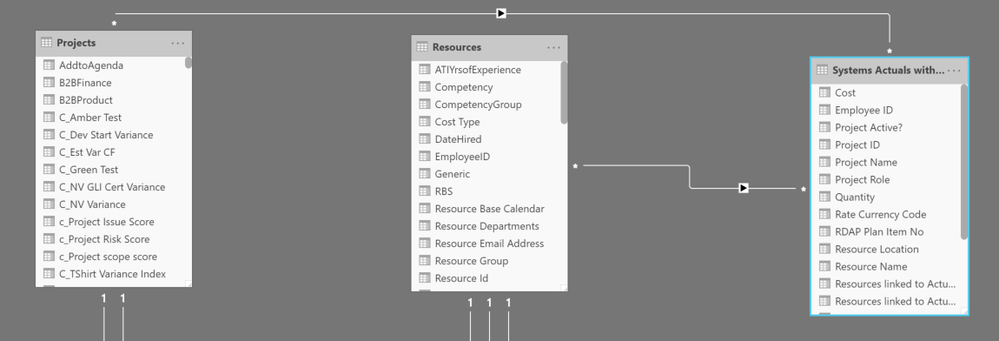
SUMX(Summarize('Systems Actuals with Teams','Systems Actuals with Teams'[Project Name]
,"_1",[Quantity],"_2",SUMX('Resources',[Resource Standard Rate])),[_1]*[_2])
Row context need to set
Hi @amitchandak ,
I appreciate the quick response. I am trying to use the DAX you provided but running into Syntax issues. Where you have [Quantity] after the _1, DAX will not allow me to use the Quantity column as specified.
This looks like a measure totals problem. Very common. See my post about it here: https://community.powerbi.com/t5/DAX-Commands-and-Tips/Dealing-with-Measure-Totals/td-p/63376
Also, this Quick Measure, Measure Totals, The Final Word should get you what you need:
https://community.powerbi.com/t5/Quick-Measures-Gallery/Measure-Totals-The-Final-Word/m-p/547907
Hi @Greg_Deckler ,
| User | Count |
|---|---|
| 51 | |
| 40 | |
| 35 | |
| 23 | |
| 22 |
| User | Count |
|---|---|
| 134 | |
| 103 | |
| 57 | |
| 43 | |
| 38 |