Join us at FabCon Atlanta from March 16 - 20, 2026, for the ultimate Fabric, Power BI, AI and SQL community-led event. Save $200 with code FABCOMM.
Register now!Get Fabric Certified for FREE during Fabric Data Days. Don't miss your chance! Request now
I'm using a sharepoint db that has about 70 columns and around 3000 rows long. I need to count the number of times each row has an entry with the word "Verified".
I tried wtih Progress = COUNTAX('TABLE', "Verified")
I've been searching on here for an hour and no luck. Seems like this would have been very simple in excel.
| Site | Access | Directions | Equipment | Databases | Contractors | Progress |
| Site1 | Verified | Verified | Incomplete | Verified | N/A | 3 |
| Site2 | Verified | Verified | Verifed | N/A | N/A | 3 |
| Site3 | Verified | Verified | Verified | Verified | Verified | 5 |
Solved! Go to Solution.
Hello @cjramsey22
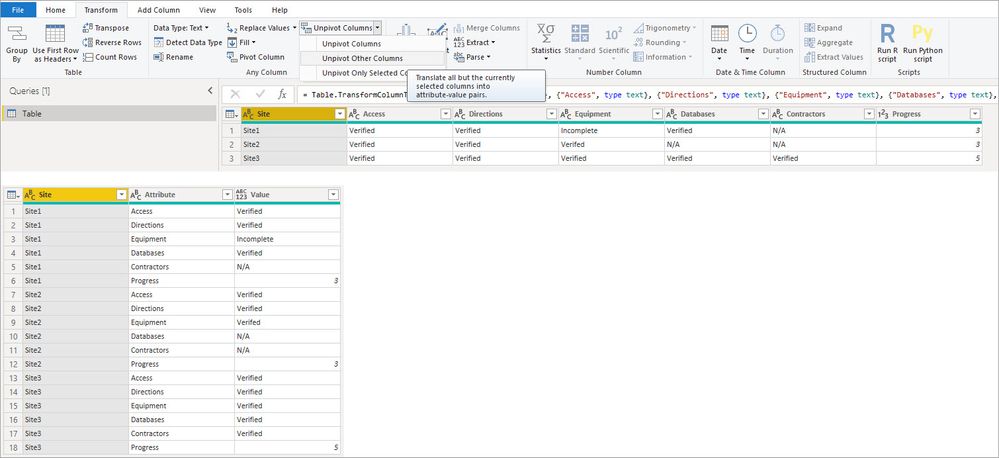
In the query editor you can unpivot the other columns so you have [Site] [Attribut] [Value] then you can do a count of the lines where the value = "Verified"
In the query editor select the site column
Go to Transform
Unpivot Columns > Unpivot Other Columns
Verified Count =
CALCULATE(
COUNTROWS( 'Table' ),
KEEPFILTERS('Table'[Value] = "Verified")
)
Hello @cjramsey22
In the query editor you can unpivot the other columns so you have [Site] [Attribut] [Value] then you can do a count of the lines where the value = "Verified"
In the query editor select the site column
Go to Transform
Unpivot Columns > Unpivot Other Columns
Verified Count =
CALCULATE(
COUNTROWS( 'Table' ),
KEEPFILTERS('Table'[Value] = "Verified")
)
Check out the November 2025 Power BI update to learn about new features.
Advance your Data & AI career with 50 days of live learning, contests, hands-on challenges, study groups & certifications and more!