cancel
Showing results for 
Search instead for 
Did you mean: 

The Power BI Data Visualization World Championships is back! Get ahead of the game and start preparing now! Learn more

Reply
Clint
Helper V
Helper V

Measure Total problems

Hello All,
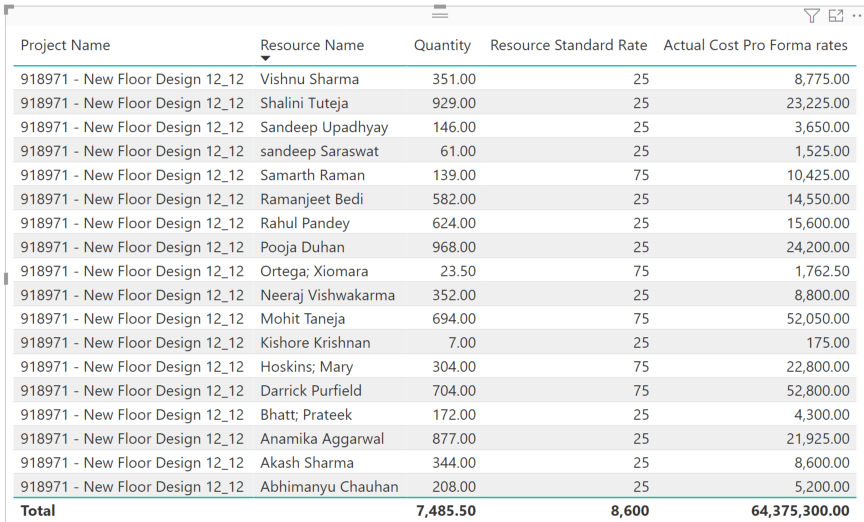
Struggling with a totals issue in BI. Per the embedded image, I have a measure that calculates the cost of each resource on a project using our pro forma rates. This is working correctly. The problem is, I'm struggling to get it to calculate the sum of all of those resources for the project. Instead, what I get is the sum of the resource rates for resources x the sum of all of their hours. I've tried to filter the measure by Project but I'm definitely doing something wrong. any insight is appreciated.
Here is the measure:
Actual Cost Pro Forma rates =
// actual quantity * resource pro forma rate
CALCULATE(
SUMX('Systems Actuals with Teams',[Quantity])*SUMX('Resources',[Resource Standard Rate]))
 
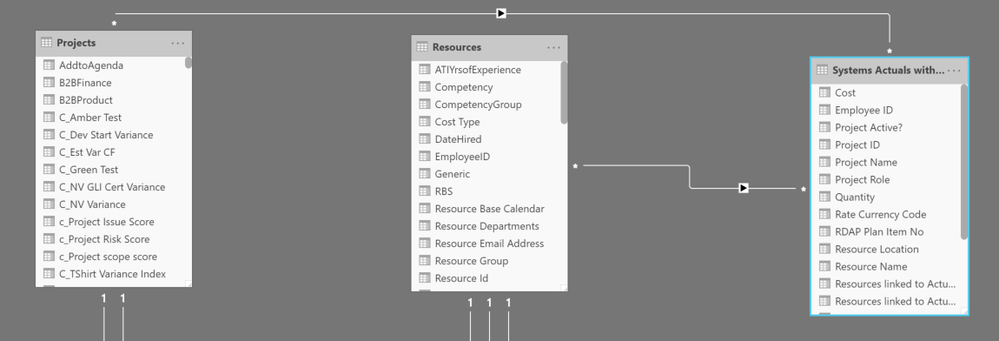
Attached is a screenshot of the table generated and a view of the relationship between the involved tables
relationship.PNGwrong total.PNG
1 ACCEPTED SOLUTION
Greg_Deckler
Community Champion
Community Champion

This looks like a measure totals problem. Very common. See my post about it here: https://community.powerbi.com/t5/DAX-Commands-and-Tips/Dealing-with-Measure-Totals/td-p/63376

Also, this Quick Measure, Measure Totals, The Final Word should get you what you need:
https://community.powerbi.com/t5/Quick-Measures-Gallery/Measure-Totals-The-Final-Word/m-p/547907


Follow on LinkedIn
@ me in replies or I'll lose your thread!!!
Instead of a Kudo, please vote for this idea
Become an expert!: Enterprise DNA
External Tools: MSHGQM
YouTube Channel!: Microsoft Hates Greg
Latest book!:
DAX For Humans

DAX is easy, CALCULATE makes DAX hard...

View solution in original post

5 REPLIES 5
amitchandak
Super User
Super User

@Clint 

Try Like

SUMX(Summarize('Systems Actuals with Teams','Systems Actuals with Teams'[Project Name]
			,"_1",[Quantity],"_2",SUMX('Resources',[Resource Standard Rate])),[_1]*[_2])


Row context need to set

Share with Power BI Enthusiasts: Full Power BI Video (20 Hours) YouTube
Microsoft Fabric Series 60+ Videos YouTube
Microsoft Fabric Hindi End to End YouTube

Hi @amitchandak ,


I appreciate the quick response.  I am trying to use the DAX you provided but running into Syntax issues.  Where you have [Quantity] after the _1, DAX will not allow me to use the Quantity column as specified.

Greg_Deckler
Community Champion
Community Champion

This looks like a measure totals problem. Very common. See my post about it here: https://community.powerbi.com/t5/DAX-Commands-and-Tips/Dealing-with-Measure-Totals/td-p/63376

Also, this Quick Measure, Measure Totals, The Final Word should get you what you need:
https://community.powerbi.com/t5/Quick-Measures-Gallery/Measure-Totals-The-Final-Word/m-p/547907


Follow on LinkedIn
@ me in replies or I'll lose your thread!!!
Instead of a Kudo, please vote for this idea
Become an expert!: Enterprise DNA
External Tools: MSHGQM
YouTube Channel!: Microsoft Hates Greg
Latest book!:
DAX For Humans

DAX is easy, CALCULATE makes DAX hard...

Hi @Greg_Deckler ,


Thanks so much for that link.  That seems to work out perfectly.
 
Pro Forma Project Actuals Total =
Var _table =SUMMARIZE('Resources',[Resource Name],"_value",[Actual Cost Pro Forma rates])
return
IF(HASONEVALUE('Resources'[Resource Name]),'Systems Actuals with Teams'[Actual Cost Pro Forma rates],SUMX(_table,[_Value]))

It's a classic! 🙂


Follow on LinkedIn
@ me in replies or I'll lose your thread!!!
Instead of a Kudo, please vote for this idea
Become an expert!: Enterprise DNA
External Tools: MSHGQM
YouTube Channel!: Microsoft Hates Greg
Latest book!:
DAX For Humans

DAX is easy, CALCULATE makes DAX hard...

Helpful resources

Announcements
November Power BI Update Carousel

Power BI Monthly Update - November 2025

Check out the November 2025 Power BI update to learn about new features.

Fabric Data Days Carousel

Fabric Data Days

Advance your Data & AI career with 50 days of live learning, contests, hands-on challenges, study groups & certifications and more!

FabCon Atlanta 2026 carousel

FabCon Atlanta 2026

Join us at FabCon Atlanta, March 16-20, for the ultimate Fabric, Power BI, AI and SQL community-led event. Save $200 with code FABCOMM.