Don't miss your chance to take the Fabric Data Engineer (DP-600) exam for FREE! Find out how by attending the DP-600 session on April 23rd (pacific time), live or on-demand.
Learn moreNext up in the FabCon + SQLCon recap series: The roadmap for Microsoft SQL and Maximizing Developer experiences in Fabric. All sessions are available on-demand after the live show. Register now
I'm new to PowerBI and I'm trying to create the visualization below and am having trouble because of a few areas:
1. I am getting an error with dates because there are gaps in the dates I'm using due to them being weekly data.
2. I am having trouble re-formatting dates because PowerBI is putting in a long-winded full date ("Monday, January 1, 2018" instead of "01/01/2018")
3. I have not figured out how to do a countif using strings.
Any help or advice would be greatly appreciated.
Thanks!
Solved! Go to Solution.
Hi @Anonymous,
I'm assuming that you want to return Yes when measure is greater than target.
Use the following measure to add to your matrix:
YES / NO =
IF (
HASONEFILTER ( Data[Week Starting] );
IF ( SUM ( Data[Measure] ) < SUM ( Data[Target] ); "No"; "Yes" );
COUNTROWS (
FILTER (
SUMMARIZE (
Data;
Data[Week Starting];
"YES/NO"; SUM ( Data[Measure] ) - SUM ( Data[Target] )
);
[YES/NO] > 0
)
)
)
Regards,
MFelix
Regards
Miguel Félix
Proud to be a Super User!
Check out my blog: Power BI em PortuguêsHi @Anonymous,
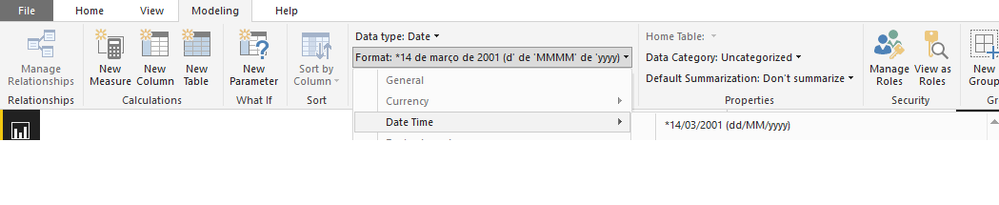
Select the date column then select the modeling on the bar and format the date as you need.
Regards,
MFelix
Regards
Miguel Félix
Proud to be a Super User!
Check out my blog: Power BI em PortuguêsHi @Anonymous,
I'm assuming that you want to return Yes when measure is greater than target.
Use the following measure to add to your matrix:
YES / NO =
IF (
HASONEFILTER ( Data[Week Starting] );
IF ( SUM ( Data[Measure] ) < SUM ( Data[Target] ); "No"; "Yes" );
COUNTROWS (
FILTER (
SUMMARIZE (
Data;
Data[Week Starting];
"YES/NO"; SUM ( Data[Measure] ) - SUM ( Data[Target] )
);
[YES/NO] > 0
)
)
)
Regards,
MFelix
Regards
Miguel Félix
Proud to be a Super User!
Check out my blog: Power BI em PortuguêsThanks Felix!! This is great! Any advice on how to adjust the format of the dates as columns?
Cheers,
Julian
Hi @Anonymous,
Select the date column then select the modeling on the bar and format the date as you need.
Regards,
MFelix
Regards
Miguel Félix
Proud to be a Super User!
Check out my blog: Power BI em PortuguêsIf you have recently started exploring Fabric, we'd love to hear how it's going. Your feedback can help with product improvements.
A new Power BI DataViz World Championship is coming this June! Don't miss out on submitting your entry.
| User | Count |
|---|---|
| 46 | |
| 43 | |
| 39 | |
| 19 | |
| 15 |
| User | Count |
|---|---|
| 68 | |
| 67 | |
| 31 | |
| 27 | |
| 24 |