Get certified for free when you join Fabric Data Days 2026 and dive into Fabric, Power BI, SQL, AI, and other essential data skills.
Join nowData Days is here! Join us now for 60+ days of learning, challenges, and connection. Learn more
I'm new to PowerBI and I'm trying to create the visualization below and am having trouble because of a few areas:
1. I am getting an error with dates because there are gaps in the dates I'm using due to them being weekly data.
2. I am having trouble re-formatting dates because PowerBI is putting in a long-winded full date ("Monday, January 1, 2018" instead of "01/01/2018")
3. I have not figured out how to do a countif using strings.
Any help or advice would be greatly appreciated.
Thanks!
Solved! Go to Solution.
Hi @Anonymous,
I'm assuming that you want to return Yes when measure is greater than target.
Use the following measure to add to your matrix:
YES / NO =
IF (
HASONEFILTER ( Data[Week Starting] );
IF ( SUM ( Data[Measure] ) < SUM ( Data[Target] ); "No"; "Yes" );
COUNTROWS (
FILTER (
SUMMARIZE (
Data;
Data[Week Starting];
"YES/NO"; SUM ( Data[Measure] ) - SUM ( Data[Target] )
);
[YES/NO] > 0
)
)
)
Regards,
MFelix
Regards
Miguel Félix
Proud to be a Super User!
Check out my blog: Power BI em PortuguêsHi @Anonymous,
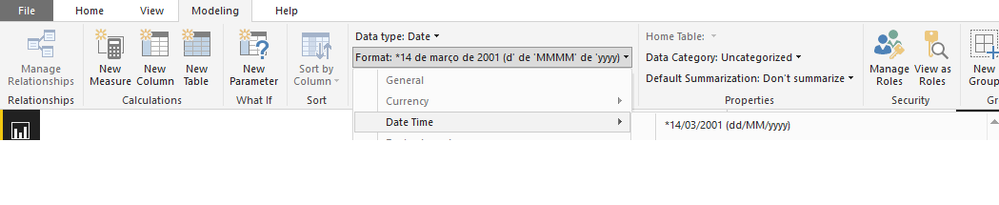
Select the date column then select the modeling on the bar and format the date as you need.
Regards,
MFelix
Regards
Miguel Félix
Proud to be a Super User!
Check out my blog: Power BI em PortuguêsHi @Anonymous,
I'm assuming that you want to return Yes when measure is greater than target.
Use the following measure to add to your matrix:
YES / NO =
IF (
HASONEFILTER ( Data[Week Starting] );
IF ( SUM ( Data[Measure] ) < SUM ( Data[Target] ); "No"; "Yes" );
COUNTROWS (
FILTER (
SUMMARIZE (
Data;
Data[Week Starting];
"YES/NO"; SUM ( Data[Measure] ) - SUM ( Data[Target] )
);
[YES/NO] > 0
)
)
)
Regards,
MFelix
Regards
Miguel Félix
Proud to be a Super User!
Check out my blog: Power BI em PortuguêsThanks Felix!! This is great! Any advice on how to adjust the format of the dates as columns?
Cheers,
Julian
Hi @Anonymous,
Select the date column then select the modeling on the bar and format the date as you need.
Regards,
MFelix
Regards
Miguel Félix
Proud to be a Super User!
Check out my blog: Power BI em PortuguêsDon't miss out on Data Days, June 15 through August 7. Learn Fabric, Power BI, SQL, AI and more.
Check out the May 2026 Power BI update to learn about new features.
| User | Count |
|---|---|
| 23 | |
| 23 | |
| 21 | |
| 17 | |
| 13 |
| User | Count |
|---|---|
| 58 | |
| 50 | |
| 37 | |
| 29 | |
| 24 |