This time we’re going bigger than ever. Fabric, Power BI, SQL, AI and more. We're covering it all. You won't want to miss it.
Learn moreLevel up your Power BI skills this month - build one visual each week and tell better stories with data! Get started
I'm new to PowerBI and I'm trying to create the visualization below and am having trouble because of a few areas:
1. I am getting an error with dates because there are gaps in the dates I'm using due to them being weekly data.
2. I am having trouble re-formatting dates because PowerBI is putting in a long-winded full date ("Monday, January 1, 2018" instead of "01/01/2018")
3. I have not figured out how to do a countif using strings.
Any help or advice would be greatly appreciated.
Thanks!
Solved! Go to Solution.
Hi @Anonymous,
I'm assuming that you want to return Yes when measure is greater than target.
Use the following measure to add to your matrix:
YES / NO =
IF (
HASONEFILTER ( Data[Week Starting] );
IF ( SUM ( Data[Measure] ) < SUM ( Data[Target] ); "No"; "Yes" );
COUNTROWS (
FILTER (
SUMMARIZE (
Data;
Data[Week Starting];
"YES/NO"; SUM ( Data[Measure] ) - SUM ( Data[Target] )
);
[YES/NO] > 0
)
)
)
Regards,
MFelix
Regards
Miguel Félix
Proud to be a Super User!
Check out my blog: Power BI em PortuguêsHi @Anonymous,
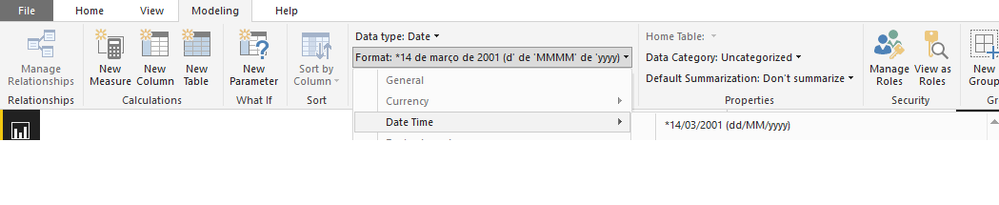
Select the date column then select the modeling on the bar and format the date as you need.
Regards,
MFelix
Regards
Miguel Félix
Proud to be a Super User!
Check out my blog: Power BI em PortuguêsHi @Anonymous,
I'm assuming that you want to return Yes when measure is greater than target.
Use the following measure to add to your matrix:
YES / NO =
IF (
HASONEFILTER ( Data[Week Starting] );
IF ( SUM ( Data[Measure] ) < SUM ( Data[Target] ); "No"; "Yes" );
COUNTROWS (
FILTER (
SUMMARIZE (
Data;
Data[Week Starting];
"YES/NO"; SUM ( Data[Measure] ) - SUM ( Data[Target] )
);
[YES/NO] > 0
)
)
)
Regards,
MFelix
Regards
Miguel Félix
Proud to be a Super User!
Check out my blog: Power BI em PortuguêsThanks Felix!! This is great! Any advice on how to adjust the format of the dates as columns?
Cheers,
Julian
Hi @Anonymous,
Select the date column then select the modeling on the bar and format the date as you need.
Regards,
MFelix
Regards
Miguel Félix
Proud to be a Super User!
Check out my blog: Power BI em PortuguêsCheck out the April 2026 Power BI update to learn about new features.
Sign up to receive a private message when registration opens and key events begin.
If you have recently started exploring Fabric, we'd love to hear how it's going. Your feedback can help with product improvements.
| User | Count |
|---|---|
| 35 | |
| 32 | |
| 25 | |
| 22 | |
| 18 |
| User | Count |
|---|---|
| 65 | |
| 35 | |
| 32 | |
| 25 | |
| 23 |