We've captured the moments from FabCon & SQLCon that everyone is talking about, and we are bringing them to the community, live and on-demand. Starts on April 14th. Register now
Hi All,
I am trying to create a matrix in excel using multiple different tables with percentages, but when I put them into the table they are all showing the same value for each row. For example the rows I am using are:
And the data I am trying to put into the table is:
I want the matrix in PowerBi to look like this
Or even like this:
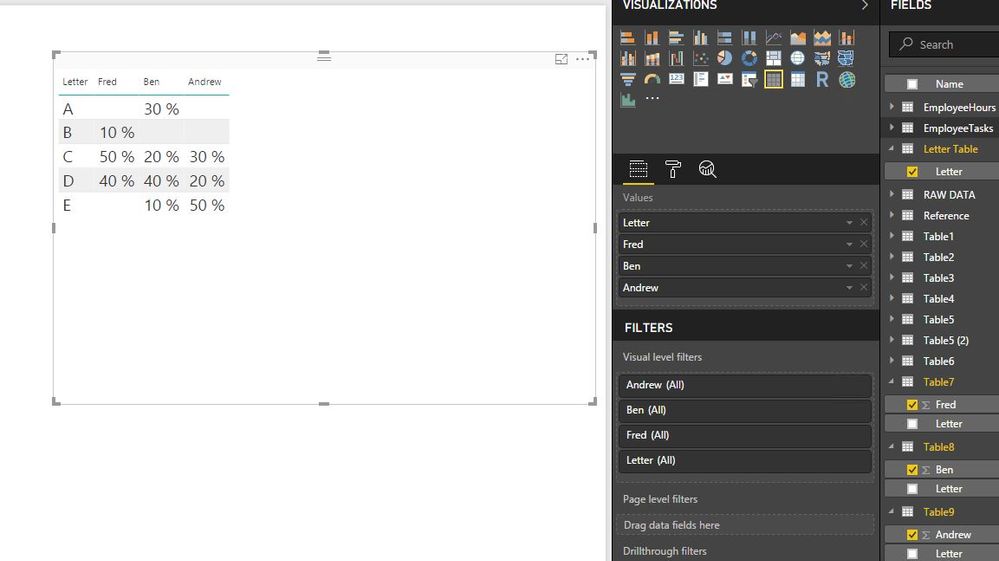
But the matrix keeps summing the columns (it is set to no calculation) like this:
How can I get all the columns into the matrix showing as their values even when the rows don't match perfectly?
Thanks:)
Solved! Go to Solution.
@KristenMackey wrote:
I am trying to create a matrix in excel using multiple different tables with percentages, but when I put them into the table they are all showing the same value for each row. For example the rows I am using are:
And the data I am trying to put into the table is:
@KristenMackey,
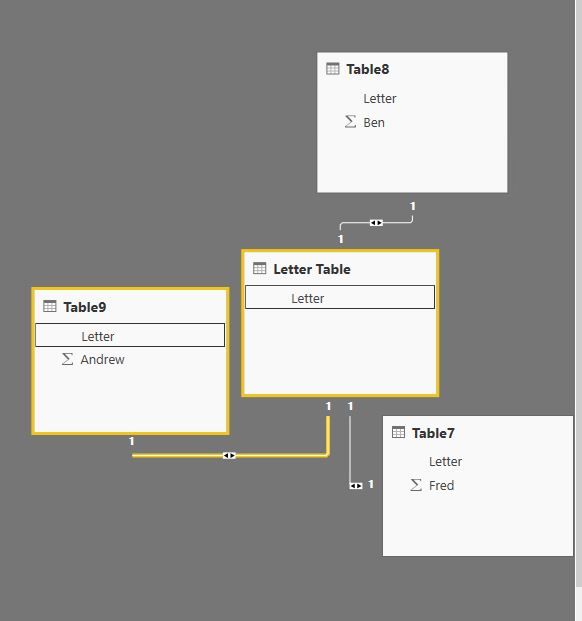
Based on the above sample data, you can directly use Letter field to create relationship among the four tables, then create a table visual to get expected result in Power BI Desktop.
Regards,
Lydia
@KristenMackey wrote:
I am trying to create a matrix in excel using multiple different tables with percentages, but when I put them into the table they are all showing the same value for each row. For example the rows I am using are:
And the data I am trying to put into the table is:
@KristenMackey,
Based on the above sample data, you can directly use Letter field to create relationship among the four tables, then create a table visual to get expected result in Power BI Desktop.
Regards,
Lydia
Hi,
You can simply merge all tables into 1 using query editor (Home > Edit Queries > Home > Combine > Merge Queries). That will get you your desired dataset
If you have recently started exploring Fabric, we'd love to hear how it's going. Your feedback can help with product improvements.
A new Power BI DataViz World Championship is coming this June! Don't miss out on submitting your entry.
Share feedback directly with Fabric product managers, participate in targeted research studies and influence the Fabric roadmap.
| User | Count |
|---|---|
| 57 | |
| 38 | |
| 33 | |
| 19 | |
| 16 |
| User | Count |
|---|---|
| 68 | |
| 66 | |
| 41 | |
| 34 | |
| 25 |