Learn from the best! Meet the four finalists headed to the FINALS of the Power BI Dataviz World Championships! Register now
Hi All,
I am trying to create a matrix in excel using multiple different tables with percentages, but when I put them into the table they are all showing the same value for each row. For example the rows I am using are:
And the data I am trying to put into the table is:
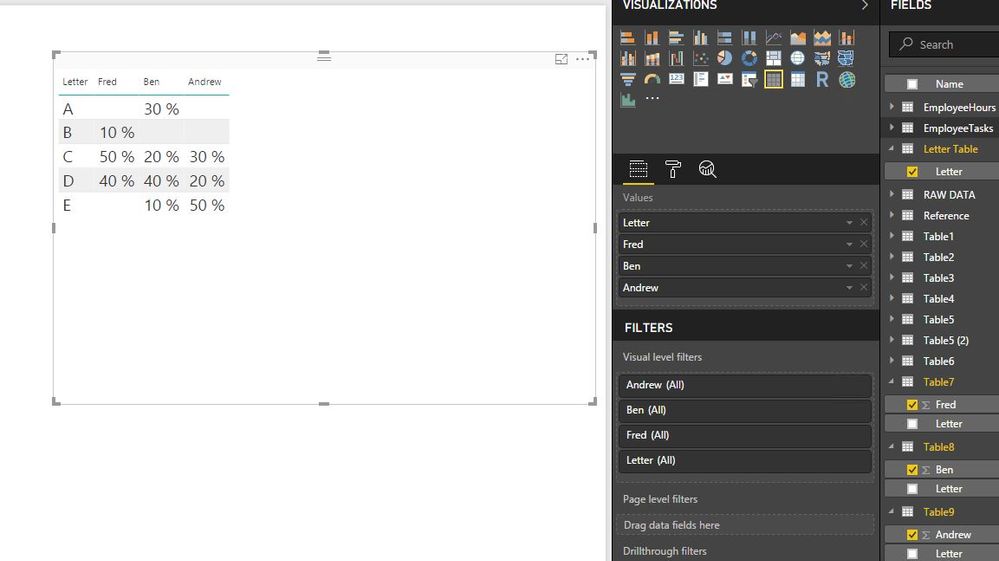
I want the matrix in PowerBi to look like this
Or even like this:
But the matrix keeps summing the columns (it is set to no calculation) like this:
How can I get all the columns into the matrix showing as their values even when the rows don't match perfectly?
Thanks:)
Solved! Go to Solution.
@KristenMackey wrote:
I am trying to create a matrix in excel using multiple different tables with percentages, but when I put them into the table they are all showing the same value for each row. For example the rows I am using are:
And the data I am trying to put into the table is:
@KristenMackey,
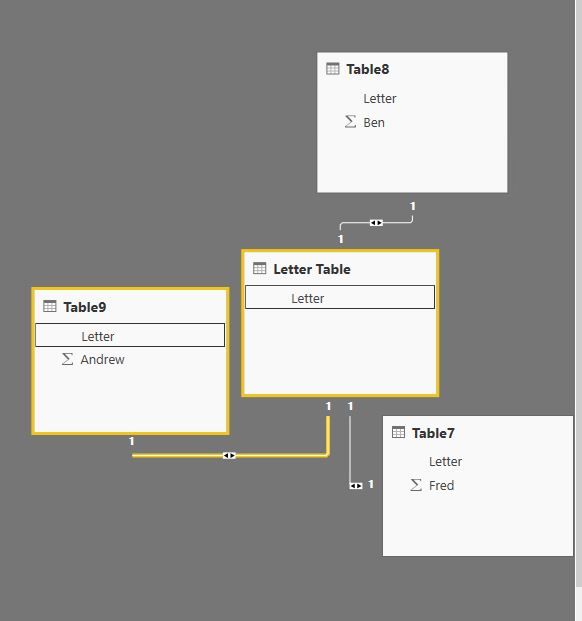
Based on the above sample data, you can directly use Letter field to create relationship among the four tables, then create a table visual to get expected result in Power BI Desktop.
Regards,
Lydia
@KristenMackey wrote:
I am trying to create a matrix in excel using multiple different tables with percentages, but when I put them into the table they are all showing the same value for each row. For example the rows I am using are:
And the data I am trying to put into the table is:
@KristenMackey,
Based on the above sample data, you can directly use Letter field to create relationship among the four tables, then create a table visual to get expected result in Power BI Desktop.
Regards,
Lydia
Hi,
You can simply merge all tables into 1 using query editor (Home > Edit Queries > Home > Combine > Merge Queries). That will get you your desired dataset
| User | Count |
|---|---|
| 52 | |
| 35 | |
| 22 | |
| 17 | |
| 17 |
| User | Count |
|---|---|
| 69 | |
| 58 | |
| 39 | |
| 21 | |
| 21 |