cancel
Showing results for 
Search instead for 
Did you mean: 

The Power BI Data Visualization World Championships is back! Get ahead of the game and start preparing now! Learn more

Reply
KristenMackey
Frequent Visitor

Matrix automatically summing columns

Hi All,

I am trying to create a matrix in excel using multiple different tables with percentages, but when I put them into the table they are all showing the same value for each row. For example the rows I am using are:

image.png

And the data I am trying to put into the table is:

image.pngimage.pngimage.png


I want the matrix in PowerBi to look like this

image.png

Or even like this:

image.png


But the matrix keeps summing the columns (it is set to no calculation) like this:

image.png


How can I get all the columns into the matrix showing as their values even when the rows don't match perfectly?

Thanks:)


1 ACCEPTED SOLUTION
Anonymous
Not applicable


@KristenMackey wrote:


I am trying to create a matrix in excel using multiple different tables with percentages, but when I put them into the table they are all showing the same value for each row. For example the rows I am using are:

image.png

And the data I am trying to put into the table is:

image.pngimage.pngimage.png


@KristenMackey,

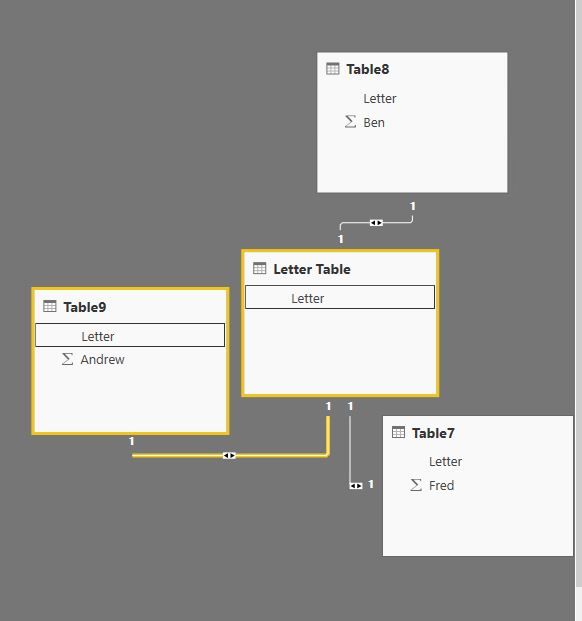
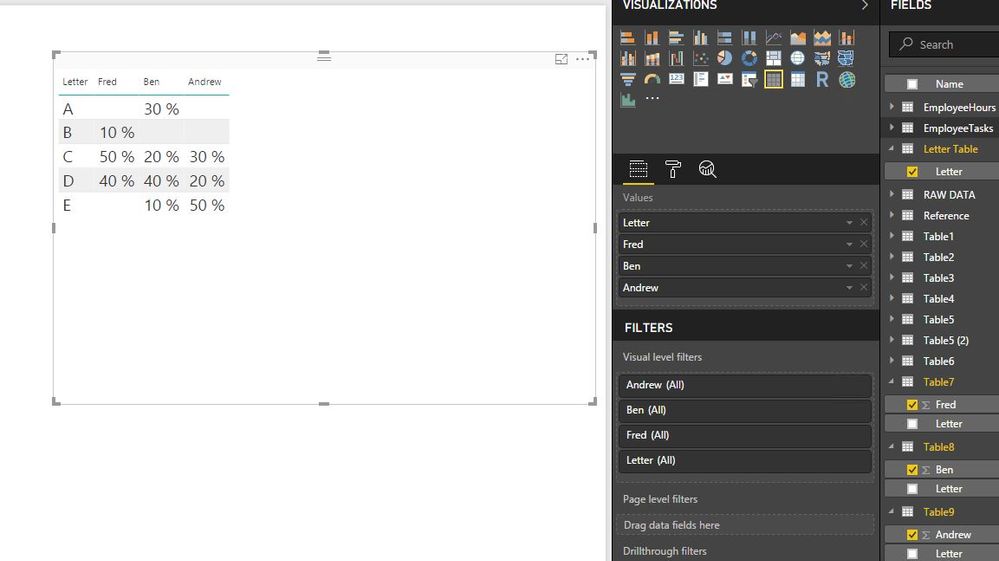
Based on the above sample data, you can directly use Letter field to create relationship among the four tables, then create a table visual to get expected result in Power BI Desktop.
1.JPG2.JPG

Regards,
Lydia

View solution in original post

2 REPLIES 2
Anonymous
Not applicable


@KristenMackey wrote:


I am trying to create a matrix in excel using multiple different tables with percentages, but when I put them into the table they are all showing the same value for each row. For example the rows I am using are:

image.png

And the data I am trying to put into the table is:

image.pngimage.pngimage.png


@KristenMackey,

Based on the above sample data, you can directly use Letter field to create relationship among the four tables, then create a table visual to get expected result in Power BI Desktop.
1.JPG2.JPG

Regards,
Lydia

Ashish_Mathur
Super User
Super User

Hi,


You can simply merge all tables into 1 using query editor (Home > Edit Queries > Home > Combine > Merge Queries).  That will get you your desired dataset


Regards,
Ashish Mathur
http://www.ashishmathur.com
https://www.linkedin.com/in/excelenthusiasts/

Helpful resources

Announcements
Power BI DataViz World Championships

Power BI Dataviz World Championships

The Power BI Data Visualization World Championships is back! Get ahead of the game and start preparing now!

December 2025 Power BI Update Carousel

Power BI Monthly Update - December 2025

Check out the December 2025 Power BI Holiday Recap!

FabCon Atlanta 2026 carousel

FabCon Atlanta 2026

Join us at FabCon Atlanta, March 16-20, for the ultimate Fabric, Power BI, AI and SQL community-led event. Save $200 with code FABCOMM.