Don't miss your chance to take the Fabric Data Engineer (DP-600) exam for FREE! Find out how by attending the DP-600 session on April 23rd (pacific time), live or on-demand.
Learn moreNext up in the FabCon + SQLCon recap series: The roadmap for Microsoft SQL and Maximizing Developer experiences in Fabric. All sessions are available on-demand after the live show. Register now
The issue I'm having is that I have 3 tables that aren't filtering with the RLS roles I have set. I have the tables setup like this:
On the report I have a table displaying the details from the Contract_Details table (there are more columns in that table that aren't shown in the picture). The Rebate_Header has an entry for each contract and the User_Contracts table has an entry for each RebateID and associated email address.
What I want to do is filter the contracts that appear depending on the logged-in using their UPN. I have defined a role that filters based on UPN like this:
[emailaddress] = Username()
When I try to view as the role I defined, the data in my table doesn't change; however, the data in the User_Contracts table is getting filtered.
The table in my report changes for the role when I have the tables setup like this:
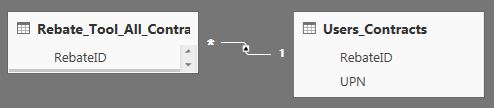
The issue is that I don't have unique RebateID's in the User_Contracts table, so this method isn't working for me. Would anyone know how to resolve this?
Solved! Go to Solution.
@S-F,
Here is a similar issue about RLS for many to many relationship model in Power BI. Please refer to the link below and check if it helps or not.
https://community.powerbi.com/t5/Desktop/RLS-not-working-totally/td-p/68342
Regards,
Charlie Liao
@S-F,
Here is a similar issue about RLS for many to many relationship model in Power BI. Please refer to the link below and check if it helps or not.
https://community.powerbi.com/t5/Desktop/RLS-not-working-totally/td-p/68342
Regards,
Charlie Liao
If you have recently started exploring Fabric, we'd love to hear how it's going. Your feedback can help with product improvements.
A new Power BI DataViz World Championship is coming this June! Don't miss out on submitting your entry.
Experience the highlights from FabCon & SQLCon, available live and on-demand starting April 14th.
| User | Count |
|---|---|
| 47 | |
| 44 | |
| 40 | |
| 20 | |
| 15 |
| User | Count |
|---|---|
| 70 | |
| 67 | |
| 32 | |
| 27 | |
| 25 |