cancel
Showing results for 
Search instead for 
Did you mean: 

We've captured the moments from FabCon & SQLCon that everyone is talking about, and we are bringing them to the community, live and on-demand. Starts on April 14th. Register now

Reply
S-F
Regular Visitor

Many-To-Many Table Relationships With RLS Not Working

The issue I'm having is that I have 3 tables that aren't filtering with the RLS roles I have set. I have the tables setup like this:


capture.png


On the report I have a table displaying the details from the Contract_Details table (there are more columns in that table that aren't shown in the picture). The Rebate_Header has an entry for each contract and the User_Contracts table has an entry for each RebateID and associated email address.


What I want to do is filter the contracts that appear depending on the logged-in using their UPN. I have defined a role that filters based on UPN like this:


    [emailaddress] = Username()


When I try to view as the role I defined, the data in my table doesn't change; however, the data in the User_Contracts table is getting filtered.


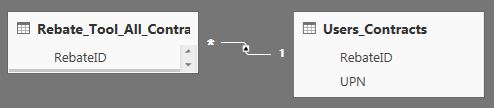
The table in my report changes for the role when I have the tables setup like this:
 

capture.png


The issue is that I don't have unique RebateID's in the User_Contracts table, so this method isn't working for me. Would anyone know how to resolve this?

1 ACCEPTED SOLUTION
v-caliao-msft
Microsoft Employee
Microsoft Employee

@S-F,


Here is a similar issue about RLS for many to many relationship model in Power BI. Please refer to the link below and check if it helps or not.
https://community.powerbi.com/t5/Desktop/RLS-not-working-totally/td-p/68342


Regards,

Charlie Liao

View solution in original post

1 REPLY 1
v-caliao-msft
Microsoft Employee
Microsoft Employee

@S-F,


Here is a similar issue about RLS for many to many relationship model in Power BI. Please refer to the link below and check if it helps or not.
https://community.powerbi.com/t5/Desktop/RLS-not-working-totally/td-p/68342


Regards,

Charlie Liao

Helpful resources

Announcements
New to Fabric survey Carousel

New to Fabric Survey

If you have recently started exploring Fabric, we'd love to hear how it's going. Your feedback can help with product improvements.

Power BI DataViz World Championships carousel

Power BI DataViz World Championships - June 2026

A new Power BI DataViz World Championship is coming this June! Don't miss out on submitting your entry.

Join our Fabric User Panel

Join our Fabric User Panel

Share feedback directly with Fabric product managers, participate in targeted research studies and influence the Fabric roadmap.

March Power BI Update Carousel

Power BI Community Update - March 2026

Check out the March 2026 Power BI update to learn about new features.