Join us at FabCon Atlanta from March 16 - 20, 2026, for the ultimate Fabric, Power BI, AI and SQL community-led event. Save $200 with code FABCOMM.
Register now!The Power BI Data Visualization World Championships is back! It's time to submit your entry. Live now!
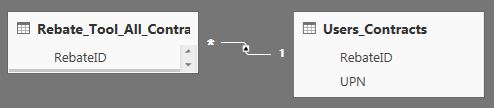
The issue I'm having is that I have 3 tables that aren't filtering with the RLS roles I have set. I have the tables setup like this:
On the report I have a table displaying the details from the Contract_Details table (there are more columns in that table that aren't shown in the picture). The Rebate_Header has an entry for each contract and the User_Contracts table has an entry for each RebateID and associated email address.
What I want to do is filter the contracts that appear depending on the logged-in using their UPN. I have defined a role that filters based on UPN like this:
[emailaddress] = Username()
When I try to view as the role I defined, the data in my table doesn't change; however, the data in the User_Contracts table is getting filtered.
The table in my report changes for the role when I have the tables setup like this:
The issue is that I don't have unique RebateID's in the User_Contracts table, so this method isn't working for me. Would anyone know how to resolve this?
Solved! Go to Solution.
@S-F,
Here is a similar issue about RLS for many to many relationship model in Power BI. Please refer to the link below and check if it helps or not.
https://community.powerbi.com/t5/Desktop/RLS-not-working-totally/td-p/68342
Regards,
Charlie Liao
@S-F,
Here is a similar issue about RLS for many to many relationship model in Power BI. Please refer to the link below and check if it helps or not.
https://community.powerbi.com/t5/Desktop/RLS-not-working-totally/td-p/68342
Regards,
Charlie Liao
| User | Count |
|---|---|
| 53 | |
| 40 | |
| 35 | |
| 24 | |
| 22 |
| User | Count |
|---|---|
| 136 | |
| 111 | |
| 58 | |
| 43 | |
| 38 |