This time we’re going bigger than ever. Fabric, Power BI, SQL, AI and more. We're covering it all. You won't want to miss it.
Learn moreLevel up your Power BI skills this month - build one visual each week and tell better stories with data! Get started
Hello, I have a table that has a Date, Amount, start date (ST), and end date (EN). I'd like to end up with a table that has the same information but rows are added for items that have start and end dates. For example, the first row has a start date of 1/2/15 and ends on 3/4/15. The final table will have a row for each month between ST and EN with the amount calculated as the full amount from the original table divided by the number of days between 1/2/15 and 2/2/15 and so forth.
If ST is empty, then the nothing changes in terms of the amount.
I had thought to create a table which will iterate through the original and split out the dates and amounts, then do a join to the original table to oftain the final table.
https://drive.google.com/open?id=0B3aXFAYB_zcpUkZXM3Y3cG04MGs
I've just started using Power BI so I am unsure how to go about getting this done. Thank you for your help.
Solved! Go to Solution.
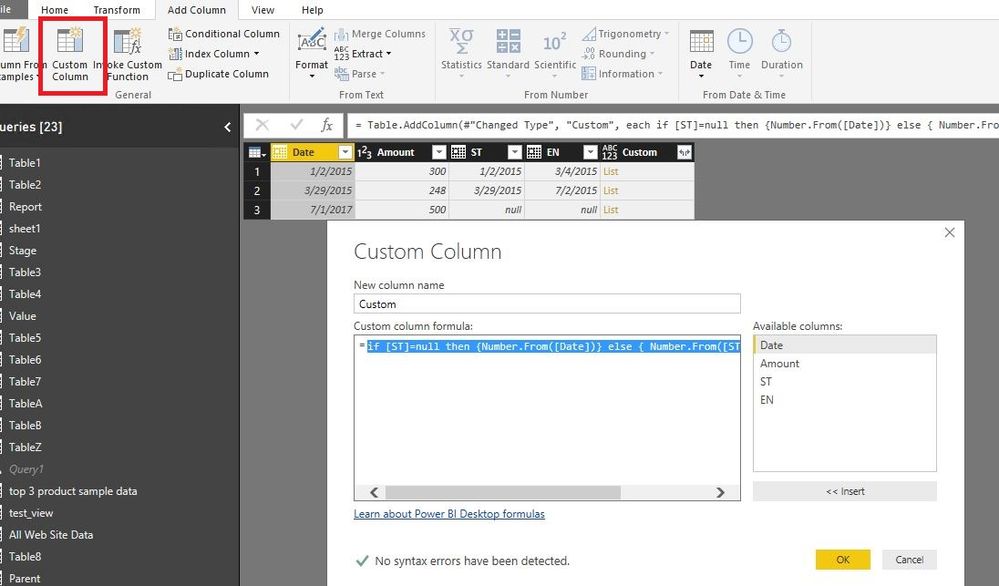
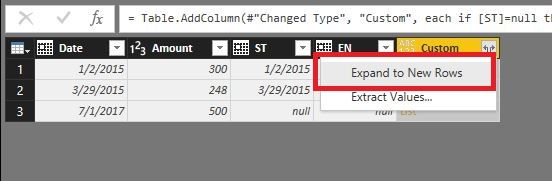
In Query Editor of Power BI Desktop, add a custom column using the following formula. Then expand the custom column to new rows and change the type of Custom column to Date.
if [ST]=null then {Number.From([Date])} else { Number.From([ST])..Number.From([EN]) }
In Report view of Power BI Desktop, right click your table and choose “New Column” to create the following columns.
Month = MONTH(Table[Custom])
FirstDay Of each month = CALCULATE(MIN(Table[Custom]),ALLEXCEPT(Table,Table[Month]))
days = DATEDIFF(Table[ST],Table[EN],DAY)
Previous = CALCULATE(FIRSTNONBLANK(Table[FirstDay Of each month],Table[FirstDay Of each month]),FILTER(Table,Table[Date]=EARLIER(Table[Date])&&Table[FirstDay Of each month]>EARLIER(Table[FirstDay Of each month])))
Column = IF(Table[Previous]=BLANK(),Table[EN],Table[Previous])
Newdays = IF(Table[Previous]=BLANK(),DATEDIFF(Table[FirstDay Of each month],Table[Column],DAY),DATEDIFF(Table[FirstDay Of each month],Table[Previous],DAY))
NewAmount = IF(Table[days]=BLANK(),Table[Amount],(Table[Newdays]/Table[days])*Table[Amount])
Regards,
Lydia
In Query Editor of Power BI Desktop, add a custom column using the following formula. Then expand the custom column to new rows and change the type of Custom column to Date.
if [ST]=null then {Number.From([Date])} else { Number.From([ST])..Number.From([EN]) }
In Report view of Power BI Desktop, right click your table and choose “New Column” to create the following columns.
Month = MONTH(Table[Custom])
FirstDay Of each month = CALCULATE(MIN(Table[Custom]),ALLEXCEPT(Table,Table[Month]))
days = DATEDIFF(Table[ST],Table[EN],DAY)
Previous = CALCULATE(FIRSTNONBLANK(Table[FirstDay Of each month],Table[FirstDay Of each month]),FILTER(Table,Table[Date]=EARLIER(Table[Date])&&Table[FirstDay Of each month]>EARLIER(Table[FirstDay Of each month])))
Column = IF(Table[Previous]=BLANK(),Table[EN],Table[Previous])
Newdays = IF(Table[Previous]=BLANK(),DATEDIFF(Table[FirstDay Of each month],Table[Column],DAY),DATEDIFF(Table[FirstDay Of each month],Table[Previous],DAY))
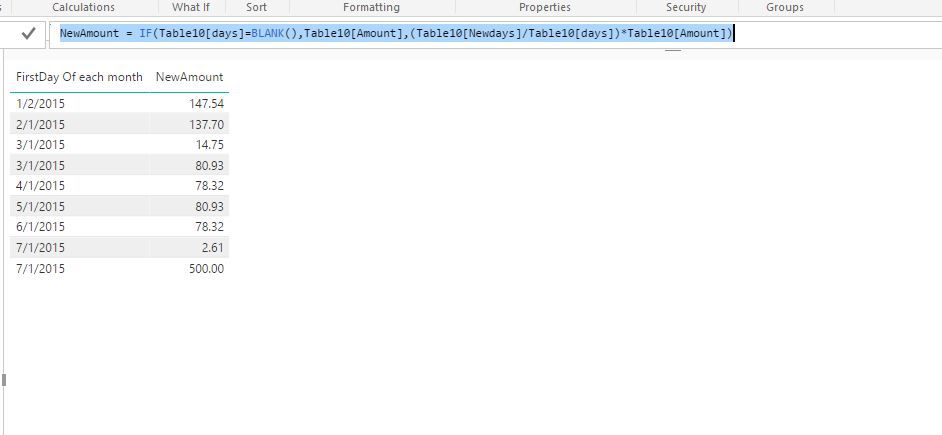
NewAmount = IF(Table[days]=BLANK(),Table[Amount],(Table[Newdays]/Table[days])*Table[Amount])
Regards,
Lydia
Thank you very much Lydia! You've helped immensely.
Check out the April 2026 Power BI update to learn about new features.
Sign up to receive a private message when registration opens and key events begin.
If you have recently started exploring Fabric, we'd love to hear how it's going. Your feedback can help with product improvements.
| User | Count |
|---|---|
| 38 | |
| 28 | |
| 27 | |
| 22 | |
| 18 |
| User | Count |
|---|---|
| 67 | |
| 37 | |
| 32 | |
| 25 | |
| 25 |