cancel
Showing results for 
Search instead for 
Did you mean: 

The Power BI Data Visualization World Championships is back! Get ahead of the game and start preparing now! Learn more

Reply
sec12tst8r84
Frequent Visitor

Loop through table and create rows

Hello, I have a table that has a Date, Amount, start date (ST), and end date (EN).  I'd like to end up with a table that has the same information but rows are added for items that have start and end dates.  For example, the first row has a start date of 1/2/15 and ends on 3/4/15.  The final table will have a row for each month between ST and EN with the amount calculated as the full amount from the original table divided by the number of days between 1/2/15 and 2/2/15 and so forth.


If ST is empty, then the nothing changes in terms of the amount.


I had thought to create a table which will iterate through the original and split out the dates and amounts, then do a join to the original table to oftain the final table.


https://drive.google.com/open?id=0B3aXFAYB_zcpUkZXM3Y3cG04MGs


I've just started using Power BI so I am unsure how to go about getting this done.  Thank you for your help.

1 ACCEPTED SOLUTION
Anonymous
Not applicable

@sec12tst8r84,

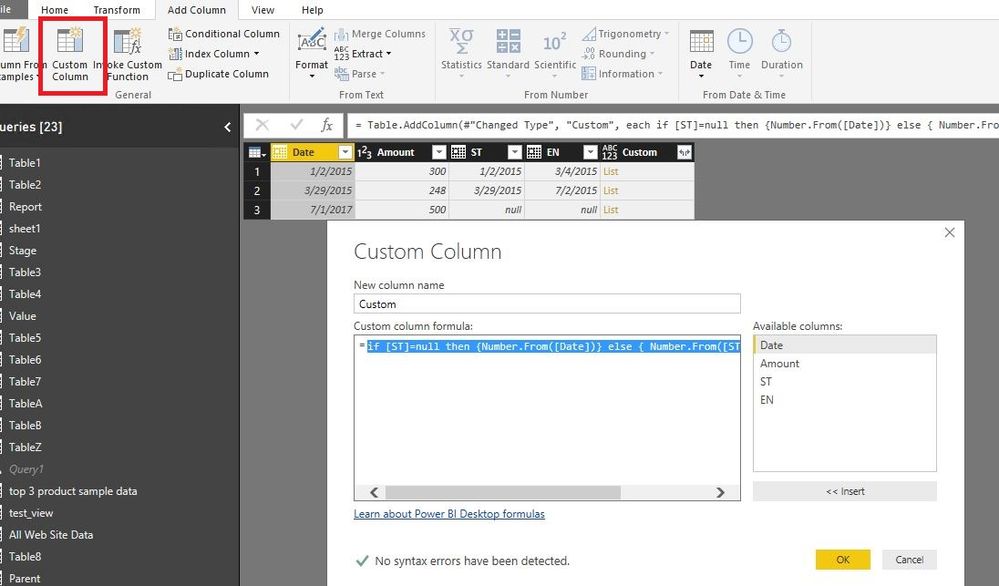
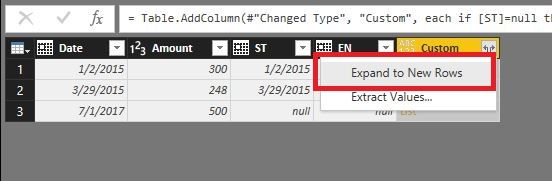
In Query Editor of Power BI Desktop, add a custom column using the following formula. Then expand  the custom column  to new rows and change  the type of Custom column  to Date.

if [ST]=null then {Number.From([Date])} else { Number.From([ST])..Number.From([EN]) }
1.JPG2.JPG


In Report view of Power BI Desktop, right click your table and choose “New Column” to create the following columns.

Month = MONTH(Table[Custom])


FirstDay Of each month = CALCULATE(MIN(Table[Custom]),ALLEXCEPT(Table,Table[Month]))

days = DATEDIFF(Table[ST],Table[EN],DAY)

Previous = CALCULATE(FIRSTNONBLANK(Table[FirstDay Of each month],Table[FirstDay Of each month]),FILTER(Table,Table[Date]=EARLIER(Table[Date])&&Table[FirstDay Of each month]>EARLIER(Table[FirstDay Of each month])))

Column = IF(Table[Previous]=BLANK(),Table[EN],Table[Previous])

Newdays = IF(Table[Previous]=BLANK(),DATEDIFF(Table[FirstDay Of each month],Table[Column],DAY),DATEDIFF(Table[FirstDay Of each month],Table[Previous],DAY))

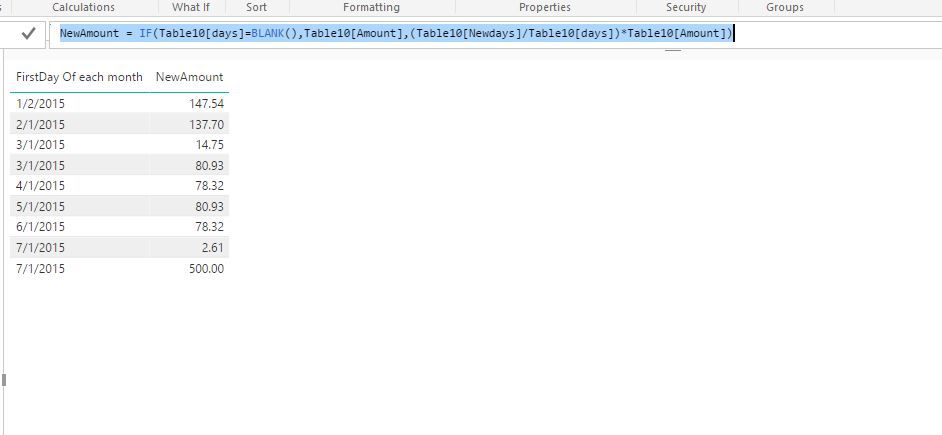
NewAmount = IF(Table[days]=BLANK(),Table[Amount],(Table[Newdays]/Table[days])*Table[Amount])
3.JPG

Regards,
Lydia

View solution in original post

2 REPLIES 2
Anonymous
Not applicable

@sec12tst8r84,

In Query Editor of Power BI Desktop, add a custom column using the following formula. Then expand  the custom column  to new rows and change  the type of Custom column  to Date.

if [ST]=null then {Number.From([Date])} else { Number.From([ST])..Number.From([EN]) }
1.JPG2.JPG


In Report view of Power BI Desktop, right click your table and choose “New Column” to create the following columns.

Month = MONTH(Table[Custom])


FirstDay Of each month = CALCULATE(MIN(Table[Custom]),ALLEXCEPT(Table,Table[Month]))

days = DATEDIFF(Table[ST],Table[EN],DAY)

Previous = CALCULATE(FIRSTNONBLANK(Table[FirstDay Of each month],Table[FirstDay Of each month]),FILTER(Table,Table[Date]=EARLIER(Table[Date])&&Table[FirstDay Of each month]>EARLIER(Table[FirstDay Of each month])))

Column = IF(Table[Previous]=BLANK(),Table[EN],Table[Previous])

Newdays = IF(Table[Previous]=BLANK(),DATEDIFF(Table[FirstDay Of each month],Table[Column],DAY),DATEDIFF(Table[FirstDay Of each month],Table[Previous],DAY))

NewAmount = IF(Table[days]=BLANK(),Table[Amount],(Table[Newdays]/Table[days])*Table[Amount])
3.JPG

Regards,
Lydia

Thank you very much Lydia! You've helped immensely.

Helpful resources

Announcements
Power BI DataViz World Championships

Power BI Dataviz World Championships

The Power BI Data Visualization World Championships is back! Get ahead of the game and start preparing now!

December 2025 Power BI Update Carousel

Power BI Monthly Update - December 2025

Check out the December 2025 Power BI Holiday Recap!

FabCon Atlanta 2026 carousel

FabCon Atlanta 2026

Join us at FabCon Atlanta, March 16-20, for the ultimate Fabric, Power BI, AI and SQL community-led event. Save $200 with code FABCOMM.