cancel
Showing results for 
Search instead for 
Did you mean: 

July 7 - July 17 | Round 2 of the Power BI Dataviz World Championships. Don't miss your chance! Learn more

Reply
sec12tst8r84
Frequent Visitor

Loop through table and create rows

Hello, I have a table that has a Date, Amount, start date (ST), and end date (EN).  I'd like to end up with a table that has the same information but rows are added for items that have start and end dates.  For example, the first row has a start date of 1/2/15 and ends on 3/4/15.  The final table will have a row for each month between ST and EN with the amount calculated as the full amount from the original table divided by the number of days between 1/2/15 and 2/2/15 and so forth.


If ST is empty, then the nothing changes in terms of the amount.


I had thought to create a table which will iterate through the original and split out the dates and amounts, then do a join to the original table to oftain the final table.


https://drive.google.com/open?id=0B3aXFAYB_zcpUkZXM3Y3cG04MGs


I've just started using Power BI so I am unsure how to go about getting this done.  Thank you for your help.

1 ACCEPTED SOLUTION
Anonymous
Not applicable

@sec12tst8r84,

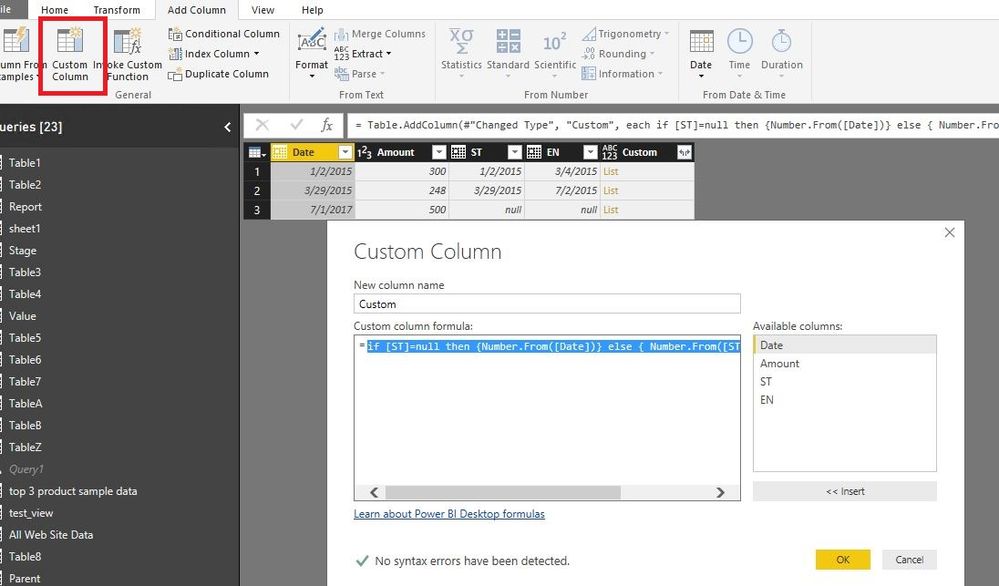
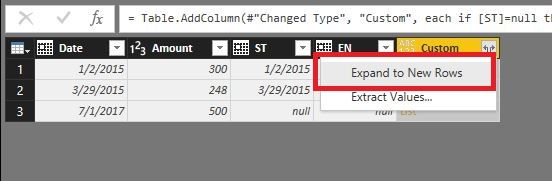
In Query Editor of Power BI Desktop, add a custom column using the following formula. Then expand  the custom column  to new rows and change  the type of Custom column  to Date.

if [ST]=null then {Number.From([Date])} else { Number.From([ST])..Number.From([EN]) }
1.JPG2.JPG


In Report view of Power BI Desktop, right click your table and choose “New Column” to create the following columns.

Month = MONTH(Table[Custom])


FirstDay Of each month = CALCULATE(MIN(Table[Custom]),ALLEXCEPT(Table,Table[Month]))

days = DATEDIFF(Table[ST],Table[EN],DAY)

Previous = CALCULATE(FIRSTNONBLANK(Table[FirstDay Of each month],Table[FirstDay Of each month]),FILTER(Table,Table[Date]=EARLIER(Table[Date])&&Table[FirstDay Of each month]>EARLIER(Table[FirstDay Of each month])))

Column = IF(Table[Previous]=BLANK(),Table[EN],Table[Previous])

Newdays = IF(Table[Previous]=BLANK(),DATEDIFF(Table[FirstDay Of each month],Table[Column],DAY),DATEDIFF(Table[FirstDay Of each month],Table[Previous],DAY))

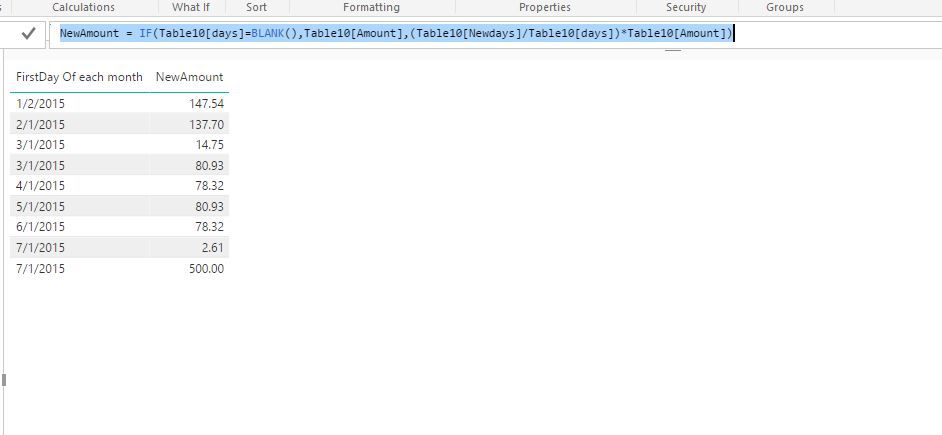
NewAmount = IF(Table[days]=BLANK(),Table[Amount],(Table[Newdays]/Table[days])*Table[Amount])
3.JPG

Regards,
Lydia

View solution in original post

2 REPLIES 2
Anonymous
Not applicable

@sec12tst8r84,

In Query Editor of Power BI Desktop, add a custom column using the following formula. Then expand  the custom column  to new rows and change  the type of Custom column  to Date.

if [ST]=null then {Number.From([Date])} else { Number.From([ST])..Number.From([EN]) }
1.JPG2.JPG


In Report view of Power BI Desktop, right click your table and choose “New Column” to create the following columns.

Month = MONTH(Table[Custom])


FirstDay Of each month = CALCULATE(MIN(Table[Custom]),ALLEXCEPT(Table,Table[Month]))

days = DATEDIFF(Table[ST],Table[EN],DAY)

Previous = CALCULATE(FIRSTNONBLANK(Table[FirstDay Of each month],Table[FirstDay Of each month]),FILTER(Table,Table[Date]=EARLIER(Table[Date])&&Table[FirstDay Of each month]>EARLIER(Table[FirstDay Of each month])))

Column = IF(Table[Previous]=BLANK(),Table[EN],Table[Previous])

Newdays = IF(Table[Previous]=BLANK(),DATEDIFF(Table[FirstDay Of each month],Table[Column],DAY),DATEDIFF(Table[FirstDay Of each month],Table[Previous],DAY))

NewAmount = IF(Table[days]=BLANK(),Table[Amount],(Table[Newdays]/Table[days])*Table[Amount])
3.JPG

Regards,
Lydia

Thank you very much Lydia! You've helped immensely.

Helpful resources

Announcements
FabCon and SQLCon Barcelona 2026

FabCon & SQLCon – Barcelona 2026

Join us in Barcelona for FabCon and SQLCon, the Fabric, Power BI, SQL, and AI community event. Save €200 with code FABCMTY200.

60 days of Data Days Carousel

Data Days 2026

Join Fabric Data Days 2026: 60 days of free live/on-demand sessions, challenges, study groups, and certification opportunities.

Power BI DataViz World Championships carousel

Power BI DataViz World Championships - June 2026

A new Power BI DataViz World Championship is coming this June! Don't miss out on submitting your entry.