This time we’re going bigger than ever. Fabric, Power BI, SQL, AI and more. We're covering it all. You won't want to miss it.
Learn moreLevel up your Power BI skills this month - build one visual each week and tell better stories with data! Get started
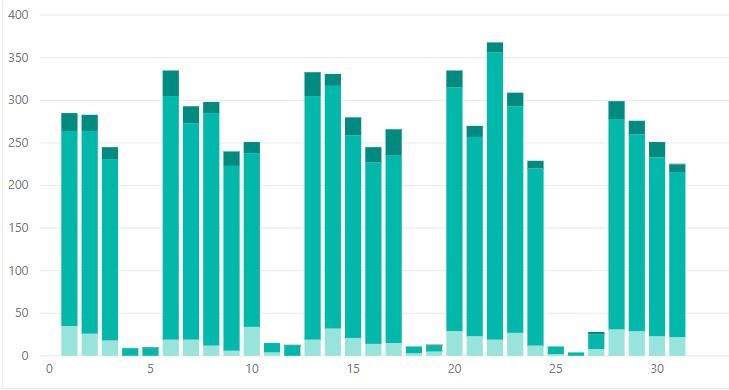
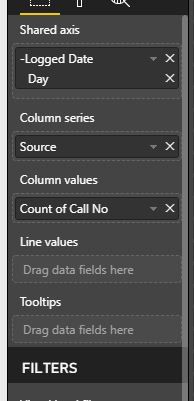
Okay, so I have a line and stack graph which shows the number of telephone calls we had over a period of time. This is then stacked by the types of calls we get.
What I now want to do is show the number of important calls we got by using the line value. Unfortunetly the 'Priority Column' includes all priorities (1,2,3,4,5). But high priorities are 1 and 2. How do I filter that?
Hi @Anonymous,
You can acheive this by a number of methods.
1. If you want to use this condition not only in this visual but also in some other visuals, simply write a dax formula where you can filter on priority
Calls Count = CALCULATE(COUNT(Table1[Calls]),Filter(Table1,Table1[Call Priority]<=2))
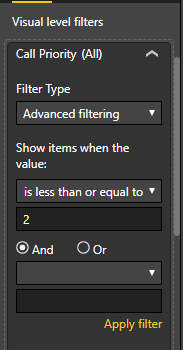
2. To only filter this visual based on priority just add the "Call Priority" to the Visual Filters and apply "less than or equal" 2.
Regards,
Affan
Hi,
Drag the Call Priority column to the Visual filter section in the visualisation pane and apply the condition of less than equal to 2.
Check out the April 2026 Power BI update to learn about new features.
Sign up to receive a private message when registration opens and key events begin.
If you have recently started exploring Fabric, we'd love to hear how it's going. Your feedback can help with product improvements.
| User | Count |
|---|---|
| 30 | |
| 24 | |
| 23 | |
| 17 | |
| 16 |
| User | Count |
|---|---|
| 61 | |
| 35 | |
| 30 | |
| 23 | |
| 22 |