Get certified for free when you join Fabric Data Days 2026 and dive into Fabric, Power BI, SQL, AI, and other essential data skills.
Join nowData Days is here! Join us now for 60+ days of learning, challenges, and connection. Learn more
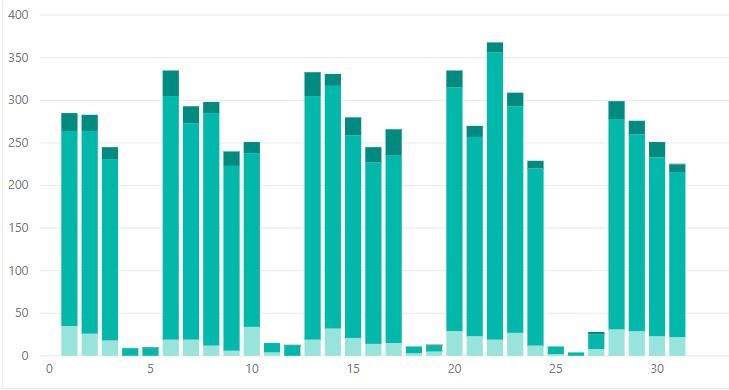
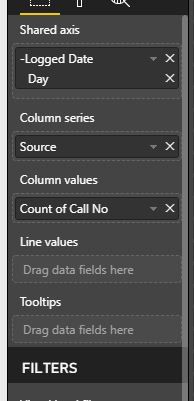
Okay, so I have a line and stack graph which shows the number of telephone calls we had over a period of time. This is then stacked by the types of calls we get.
What I now want to do is show the number of important calls we got by using the line value. Unfortunetly the 'Priority Column' includes all priorities (1,2,3,4,5). But high priorities are 1 and 2. How do I filter that?
Hi @Anonymous,
You can acheive this by a number of methods.
1. If you want to use this condition not only in this visual but also in some other visuals, simply write a dax formula where you can filter on priority
Calls Count = CALCULATE(COUNT(Table1[Calls]),Filter(Table1,Table1[Call Priority]<=2))
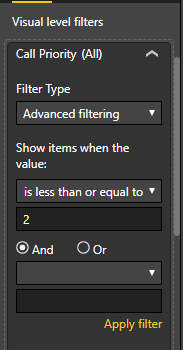
2. To only filter this visual based on priority just add the "Call Priority" to the Visual Filters and apply "less than or equal" 2.
Regards,
Affan
Hi,
Drag the Call Priority column to the Visual filter section in the visualisation pane and apply the condition of less than equal to 2.
Don't miss out on Data Days, June 15 through August 7. Learn Fabric, Power BI, SQL, AI and more.
Check out the May 2026 Power BI update to learn about new features.
| User | Count |
|---|---|
| 23 | |
| 23 | |
| 21 | |
| 17 | |
| 13 |
| User | Count |
|---|---|
| 58 | |
| 51 | |
| 39 | |
| 29 | |
| 24 |