This time we’re going bigger than ever. Fabric, Power BI, SQL, AI and more. We're covering it all. You won't want to miss it.
Learn moreDid you hear? There's a new SQL AI Developer certification (DP-800). Start preparing now and be one of the first to get certified. Register now
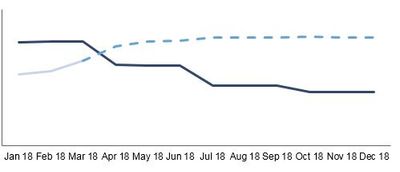
Hi, I'm new to Power BI and I know there's still a lot to learn. I'm just doing some basic visual to get used to the tool. I have a line chart with Budget vs Forecast by month. It looks like the first image below. The black line is the budget and the blue line is the actual for the past period and forecast for the future periods. Is there a way to have different line style for actual and forecast, for example, solid line for actual and dash for future forecast, like the second image?
Bugdet vs Actual
Hi @Adore,
There is a workaround. It seems you have the forecast data in the source table. Maybe you can use two measures for each part. The two measures will join in a dot. Have a look at the sample below.
Measure 16 =
CALCULATE (
SUM ( FactSales[SalesQuantity] ),
FILTER ( DimDate, DimDate[Datekey] <= DATE ( 2008, 1, 31 ) )
)Measure 17 =
CALCULATE (
SUM ( FactSales[SalesQuantity] ),
FILTER ( DimDate, DimDate[Datekey] >= DATE ( 2008, 1, 1 ) )
)
Best Regards,
Dale
@Adore under your properties ie. the paintbrush on the right hand side of your pane, look for shapes, you can change the lines there
Proud to be a Super User!
Thanks. How would I have two different line style for the same series though? I need to have a solid line up to April and dash from May onwards.
@Adore as far as i know you can't do it for the same line, you will have to do two different lines however if they have the same amounts up until the point it becomes a forecast it should be easy to almost look like they are the same line... if that makes sense?
Proud to be a Super User!
Check out the April 2026 Power BI update to learn about new features.
Sign up to receive a private message when registration opens and key events begin.
If you have recently started exploring Fabric, we'd love to hear how it's going. Your feedback can help with product improvements.
| User | Count |
|---|---|
| 36 | |
| 33 | |
| 31 | |
| 21 | |
| 16 |
| User | Count |
|---|---|
| 66 | |
| 55 | |
| 31 | |
| 26 | |
| 23 |