cancel
Showing results for 
Search instead for 
Did you mean: 

Next up in the FabCon + SQLCon recap series: The roadmap for Microsoft SQL and Maximizing Developer experiences in Fabric. All sessions are available on-demand after the live show. Register now

Reply
David_1970
Frequent Visitor

Learning DAX

How do I create a measure calculating the difference in Money between Reveneu and Disbursement ONLY when Revenue > 0, i.e. when Revenue = 0 no subtraction should be made?


CustomerMoneyTypeDateMonth
1 Revenue201701
2365Revenue201702
3 Revenue201703
3 Revenue201704
2152Revenue201705
5325Revenue201706
4 Revenue201707
1 Disbursement201701
218Disbursement201702
332Disbursement201703
3 Disbursement201704
254Disbursement201705
5 Disbursement201706
469Disbursement201707
1 ACCEPTED SOLUTION
v-ljerr-msft
Microsoft Employee
Microsoft Employee

Hi @David_1970,


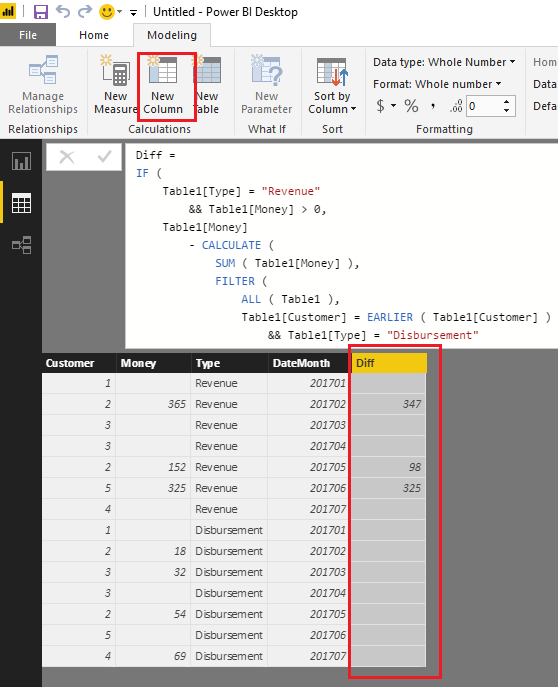
If I understand you correctly, you should be able to firstly use the formula below to create a new calculate column in your table.

Diff = 
IF (
    Table1[Type] = "Revenue"
        && Table1[Money] > 0,
    Table1[Money]
        - CALCULATE (
            SUM ( Table1[Money] ),
            FILTER (
                ALL ( Table1 ),
                Table1[Customer] = EARLIER ( Table1[Customer] )
                    && Table1[Type] = "Disbursement"
                    && Table1[DateMonth] = EARLIER ( Table1[DateMonth] )
            )
        )
)

c1.PNG


Then use the formula below to create a new measure to calculate the difference in Money between Revenue and Disbursement in your scenario. Smiley Happy

Measure = SUM(Table1[Diff])

m1.PNG


Note: You will need to replace Table1 with your real table name in the formulas above.


Regards

View solution in original post

3 REPLIES 3
v-ljerr-msft
Microsoft Employee
Microsoft Employee

Hi @David_1970,


If I understand you correctly, you should be able to firstly use the formula below to create a new calculate column in your table.

Diff = 
IF (
    Table1[Type] = "Revenue"
        && Table1[Money] > 0,
    Table1[Money]
        - CALCULATE (
            SUM ( Table1[Money] ),
            FILTER (
                ALL ( Table1 ),
                Table1[Customer] = EARLIER ( Table1[Customer] )
                    && Table1[Type] = "Disbursement"
                    && Table1[DateMonth] = EARLIER ( Table1[DateMonth] )
            )
        )
)

c1.PNG


Then use the formula below to create a new measure to calculate the difference in Money between Revenue and Disbursement in your scenario. Smiley Happy

Measure = SUM(Table1[Diff])

m1.PNG


Note: You will need to replace Table1 with your real table name in the formulas above.


Regards

Hi again,


By the way, what is the ALL-function all about - I mean, isn't that function supposed to eliminate any filters?


But since we are dealing with a calculated column (not a measure) there should be no filter context, or have I mixed things up?

Hi @David_1970,


You're right! The ALL function is not needed here. Thanks for pointing it out. Smiley Happy


Regards

Helpful resources

Announcements
New to Fabric survey Carousel

New to Fabric Survey

If you have recently started exploring Fabric, we'd love to hear how it's going. Your feedback can help with product improvements.

Power BI DataViz World Championships carousel

Power BI DataViz World Championships - June 2026

A new Power BI DataViz World Championship is coming this June! Don't miss out on submitting your entry.

Join our Fabric User Panel

Join our Fabric User Panel

Share feedback directly with Fabric product managers, participate in targeted research studies and influence the Fabric roadmap.

March Power BI Update Carousel

Power BI Community Update - March 2026

Check out the March 2026 Power BI update to learn about new features.