Share feedback directly with Fabric product managers, participate in targeted research studies and influence the Fabric roadmap.
Sign up nowGet Fabric certified for FREE! Don't miss your chance! Learn more
How do I create a measure calculating the difference in Money between Reveneu and Disbursement ONLY when Revenue > 0, i.e. when Revenue = 0 no subtraction should be made?
| Customer | Money | Type | DateMonth |
| 1 | Revenue | 201701 | |
| 2 | 365 | Revenue | 201702 |
| 3 | Revenue | 201703 | |
| 3 | Revenue | 201704 | |
| 2 | 152 | Revenue | 201705 |
| 5 | 325 | Revenue | 201706 |
| 4 | Revenue | 201707 | |
| 1 | Disbursement | 201701 | |
| 2 | 18 | Disbursement | 201702 |
| 3 | 32 | Disbursement | 201703 |
| 3 | Disbursement | 201704 | |
| 2 | 54 | Disbursement | 201705 |
| 5 | Disbursement | 201706 | |
| 4 | 69 | Disbursement | 201707 |
Solved! Go to Solution.
Hi @David_1970,
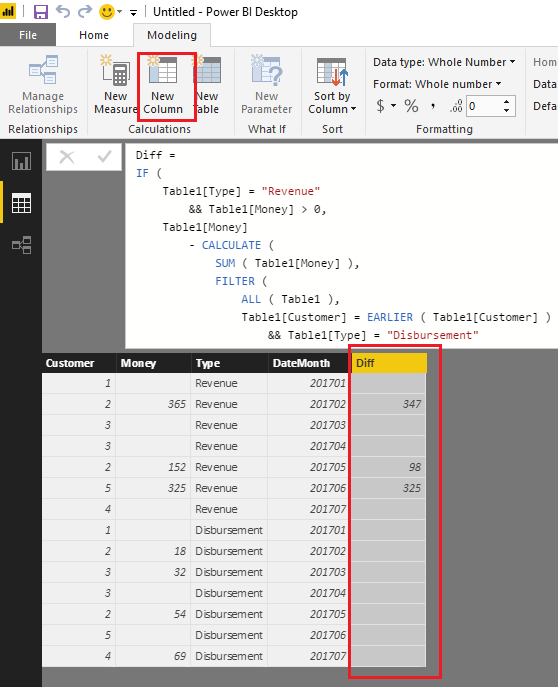
If I understand you correctly, you should be able to firstly use the formula below to create a new calculate column in your table.
Diff =
IF (
Table1[Type] = "Revenue"
&& Table1[Money] > 0,
Table1[Money]
- CALCULATE (
SUM ( Table1[Money] ),
FILTER (
ALL ( Table1 ),
Table1[Customer] = EARLIER ( Table1[Customer] )
&& Table1[Type] = "Disbursement"
&& Table1[DateMonth] = EARLIER ( Table1[DateMonth] )
)
)
)
Then use the formula below to create a new measure to calculate the difference in Money between Revenue and Disbursement in your scenario. ![]()
Measure = SUM(Table1[Diff])
Note: You will need to replace Table1 with your real table name in the formulas above.
Regards
Hi @David_1970,
If I understand you correctly, you should be able to firstly use the formula below to create a new calculate column in your table.
Diff =
IF (
Table1[Type] = "Revenue"
&& Table1[Money] > 0,
Table1[Money]
- CALCULATE (
SUM ( Table1[Money] ),
FILTER (
ALL ( Table1 ),
Table1[Customer] = EARLIER ( Table1[Customer] )
&& Table1[Type] = "Disbursement"
&& Table1[DateMonth] = EARLIER ( Table1[DateMonth] )
)
)
)
Then use the formula below to create a new measure to calculate the difference in Money between Revenue and Disbursement in your scenario. ![]()
Measure = SUM(Table1[Diff])
Note: You will need to replace Table1 with your real table name in the formulas above.
Regards
Hi again,
By the way, what is the ALL-function all about - I mean, isn't that function supposed to eliminate any filters?
But since we are dealing with a calculated column (not a measure) there should be no filter context, or have I mixed things up?
Hi @David_1970,
You're right! The ALL function is not needed here. Thanks for pointing it out. ![]()
Regards
Share feedback directly with Fabric product managers, participate in targeted research studies and influence the Fabric roadmap.
| User | Count |
|---|---|
| 63 | |
| 62 | |
| 42 | |
| 19 | |
| 16 |
| User | Count |
|---|---|
| 113 | |
| 105 | |
| 36 | |
| 28 | |
| 28 |