Get certified for free when you join Fabric Data Days 2026 and dive into Fabric, Power BI, SQL, AI, and other essential data skills.
Join nowJuly 7 - July 17 | Round 2 of the Power BI Dataviz World Championships. Don't miss your chance! Learn more
Dear Team,
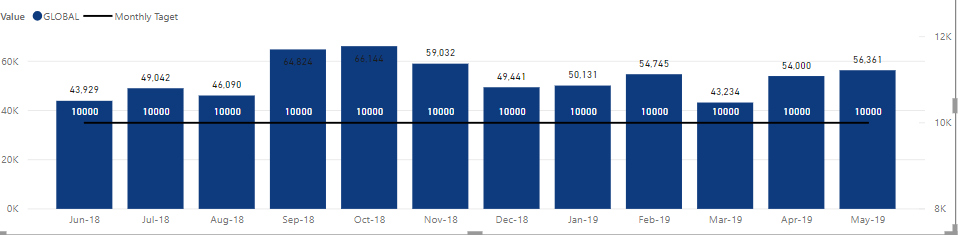
I am having a Visual that has line value which I need to have dynamically based on user input. Currently, I made it as a fixed measure like below. so the 10000 is a calculated measure as "Monthly Target = 10000". now what I want is a filter that a user can key in any value and this line changes based on the key in value, is it possible? let's say if I key in 15000 then it should go as 15000.
Solved! Go to Solution.
you can have a drop down but you can't allow the user to search for a value, unfortunately. Maybe there are custom visuals taht allow you to do it...
Well, "any" value is not easy but
- create a table with all the values you want to show (one row per value)
- put a slicer where you select the value
- then your measure that you show on the line will be "Target=SELECTEDVALUE(yourtable[yourcolumn])
The issue is that your table can contain a finite number of values, not "any"
Thnaks, how about if we can have in 000, min 10,000 and max 50000 is it possible , i cannot have drop down, a user can select 11,000 but with a list how long it can go.
you can have a drop down but you can't allow the user to search for a value, unfortunately. Maybe there are custom visuals taht allow you to do it...
Join us in Barcelona for FabCon and SQLCon, the Fabric, Power BI, SQL, and AI community event. Save €200 with code FABCMTY200.
Join Fabric Data Days 2026: 60 days of free live/on-demand sessions, challenges, study groups, and certification opportunities.
| User | Count |
|---|---|
| 65 | |
| 41 | |
| 40 | |
| 39 | |
| 39 |