Join us at FabCon Atlanta from March 16 - 20, 2026, for the ultimate Fabric, Power BI, AI and SQL community-led event. Save $200 with code FABCOMM.
Register now!The Power BI Data Visualization World Championships is back! It's time to submit your entry. Live now!
Dear Team,
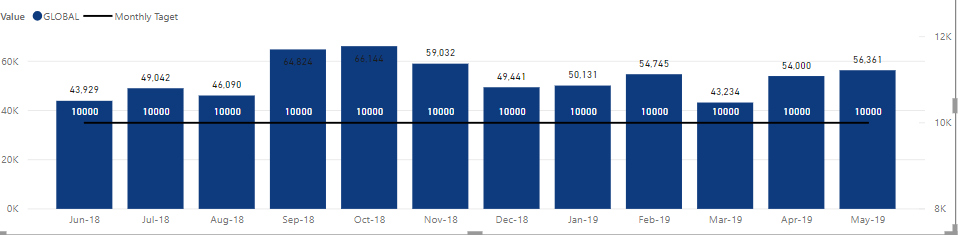
I am having a Visual that has line value which I need to have dynamically based on user input. Currently, I made it as a fixed measure like below. so the 10000 is a calculated measure as "Monthly Target = 10000". now what I want is a filter that a user can key in any value and this line changes based on the key in value, is it possible? let's say if I key in 15000 then it should go as 15000.
Solved! Go to Solution.
you can have a drop down but you can't allow the user to search for a value, unfortunately. Maybe there are custom visuals taht allow you to do it...
Well, "any" value is not easy but
- create a table with all the values you want to show (one row per value)
- put a slicer where you select the value
- then your measure that you show on the line will be "Target=SELECTEDVALUE(yourtable[yourcolumn])
The issue is that your table can contain a finite number of values, not "any"
Thnaks, how about if we can have in 000, min 10,000 and max 50000 is it possible , i cannot have drop down, a user can select 11,000 but with a list how long it can go.
you can have a drop down but you can't allow the user to search for a value, unfortunately. Maybe there are custom visuals taht allow you to do it...
The Power BI Data Visualization World Championships is back! It's time to submit your entry.
Check out the January 2026 Power BI update to learn about new features.
| User | Count |
|---|---|
| 61 | |
| 48 | |
| 35 | |
| 25 | |
| 23 |
| User | Count |
|---|---|
| 134 | |
| 110 | |
| 59 | |
| 39 | |
| 32 |