This time we’re going bigger than ever. Fabric, Power BI, SQL, AI and more. We're covering it all. You won't want to miss it.
Learn moreDid you hear? There's a new SQL AI Developer certification (DP-800). Start preparing now and be one of the first to get certified. Register now
Dear Team,
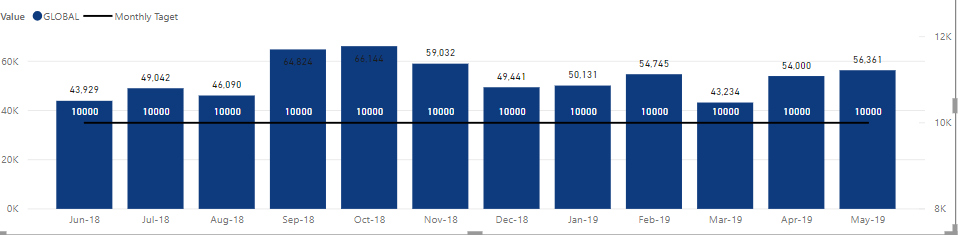
I am having a Visual that has line value which I need to have dynamically based on user input. Currently, I made it as a fixed measure like below. so the 10000 is a calculated measure as "Monthly Target = 10000". now what I want is a filter that a user can key in any value and this line changes based on the key in value, is it possible? let's say if I key in 15000 then it should go as 15000.
Solved! Go to Solution.
you can have a drop down but you can't allow the user to search for a value, unfortunately. Maybe there are custom visuals taht allow you to do it...
Well, "any" value is not easy but
- create a table with all the values you want to show (one row per value)
- put a slicer where you select the value
- then your measure that you show on the line will be "Target=SELECTEDVALUE(yourtable[yourcolumn])
The issue is that your table can contain a finite number of values, not "any"
Thnaks, how about if we can have in 000, min 10,000 and max 50000 is it possible , i cannot have drop down, a user can select 11,000 but with a list how long it can go.
you can have a drop down but you can't allow the user to search for a value, unfortunately. Maybe there are custom visuals taht allow you to do it...
Check out the April 2026 Power BI update to learn about new features.
Sign up to receive a private message when registration opens and key events begin.
If you have recently started exploring Fabric, we'd love to hear how it's going. Your feedback can help with product improvements.
| User | Count |
|---|---|
| 34 | |
| 31 | |
| 30 | |
| 21 | |
| 16 |
| User | Count |
|---|---|
| 65 | |
| 53 | |
| 31 | |
| 23 | |
| 23 |