Get certified for free when you join Fabric Data Days 2026 and dive into Fabric, Power BI, SQL, AI, and other essential data skills.
Join nowJuly 7 - July 17 | Round 2 of the Power BI Dataviz World Championships. Don't miss your chance! Learn more
Dear Team,
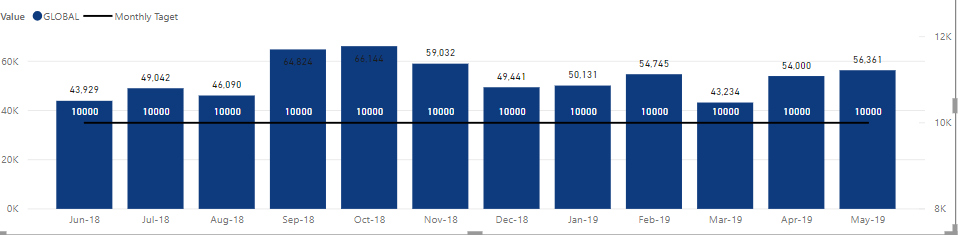
I am having a Visual that has line value which I need to have dynamically based on user input. Currently, I made it as a fixed measure like below. so the 10000 is a calculated measure as "Monthly Target = 10000". now what I want is a filter that a user can key in any value and this line changes based on the key in value, is it possible? let's say if I key in 15000 then it should go as 15000.
Solved! Go to Solution.
you can have a drop down but you can't allow the user to search for a value, unfortunately. Maybe there are custom visuals taht allow you to do it...
Well, "any" value is not easy but
- create a table with all the values you want to show (one row per value)
- put a slicer where you select the value
- then your measure that you show on the line will be "Target=SELECTEDVALUE(yourtable[yourcolumn])
The issue is that your table can contain a finite number of values, not "any"
Thnaks, how about if we can have in 000, min 10,000 and max 50000 is it possible , i cannot have drop down, a user can select 11,000 but with a list how long it can go.
you can have a drop down but you can't allow the user to search for a value, unfortunately. Maybe there are custom visuals taht allow you to do it...
Join us in Barcelona for FabCon and SQLCon, the Fabric, Power BI, SQL, and AI community event. Save €200 with code FABCMTY200.
If you love stickers, then you will definitely want to check out our community sticker challenge, Barcelona edition!
Check out the July 2026 Power BI update to learn about new features.
| User | Count |
|---|---|
| 29 | |
| 23 | |
| 23 | |
| 22 | |
| 14 |
| User | Count |
|---|---|
| 48 | |
| 33 | |
| 20 | |
| 18 | |
| 16 |