cancel
Showing results for 
Search instead for 
Did you mean: 

The Power BI Data Visualization World Championships is back! Get ahead of the game and start preparing now! Learn more

Reply
sajarac
Helper III
Helper III

KPi image inside Matrix table

Hi there, 


Very new here, and probably this question is already resolved but I cannot figure out.


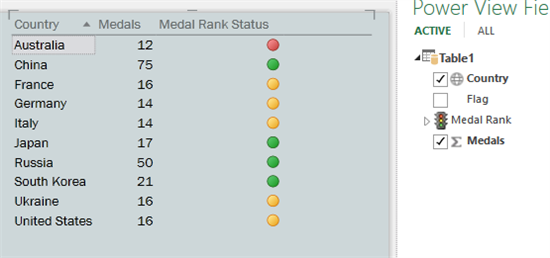
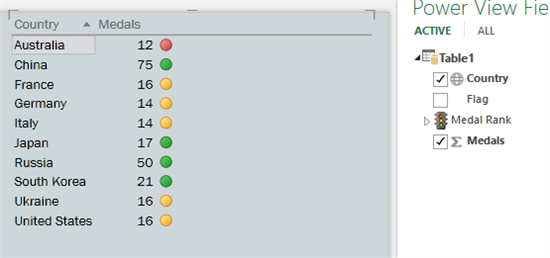
I have my data in a matrix table with a list aof Sales Representatives + 3 columns in the first column sales and ther other 2 count of


I need to show in the first column a green button for sales over $10,000, a red button less than $10,000 and for the other two column green for count over 5 and red for count less than five.


Thanks in advance for any help!


Regards

1.png2.png

1 ACCEPTED SOLUTION

Hi @sajarac,

Based on my research, you could use the UNICHAR function to show different shape, you could refer below link to set different symbols:

https://community.powerbi.com/t5/Community-Blog/Power-BI-Desktop-DAX-Using-Unicode-Arrows-as-Measure...

List of Unicode Symbols:

https://www.vertex42.com/ExcelTips/unicode-symbols.html


Regards,

Daniel He


Community Support Team _ Daniel He
If this post helps, then please consider Accept it as the solution to help the other members find it more quickly.

View solution in original post

5 REPLIES 5
Greg_Deckler
Community Champion
Community Champion

There are lots of different ways of doing this. Here are a couple.


https://community.powerbi.com/t5/Quick-Measures-Gallery/SVG-Multi-Shape-Multi-Color-Indicators/m-p/5...


https://community.powerbi.com/t5/Quick-Measures-Gallery/Simple-SVG-KPI-Power-BI-august-2018-update/m...


https://community.powerbi.com/t5/Community-Blog/Power-BI-Desktop-Custom-Aggregations-Formatting-and-...


Follow on LinkedIn
@ me in replies or I'll lose your thread!!!
Instead of a Kudo, please vote for this idea
Become an expert!: Enterprise DNA
External Tools: MSHGQM
YouTube Channel!: Microsoft Hates Greg
Latest book!:
DAX For Humans

DAX is easy, CALCULATE makes DAX hard...

Thank you very much for your prompt reply.


However it seems like is designed for expert user, and I am currently in baby steps.


I know how to apply icons sets in excel and I was hopping to see the same fuctionality here in PBI. So far I have my table with conditional format "Font Chage" i.e if this number is below to 10,000 red, green.


But I would like to add a nice shape

Anonymous
Not applicable

hi @sajarac 


I am also taking baby steps.

Curious to know how did you sort this one out?

I have the same need and seem to be facing the same problems as you. and have the same skill level 🙂


Thank you

J

Hi,


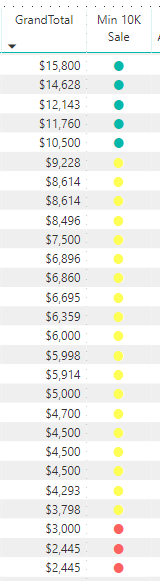
I created a Measure i.e KPI


KPI = UNICHAR(11044)


Then in my table I have added a column "KPI" KPI in my case was rename to "Min 10K Sale"


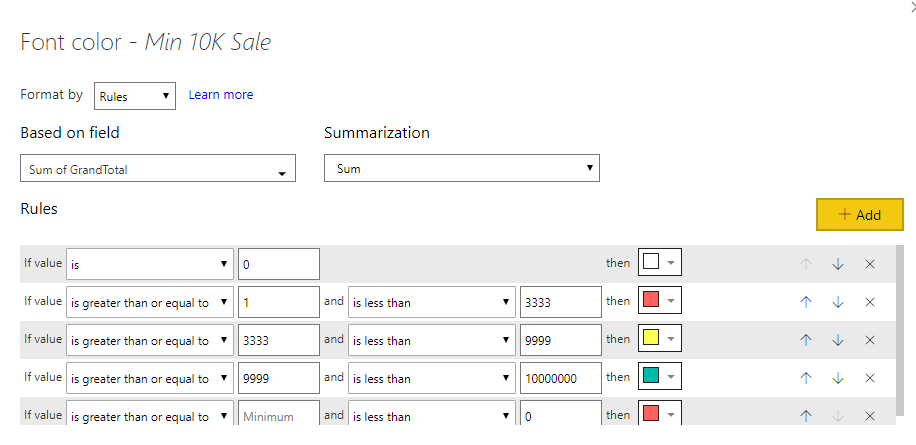
Now in that column for the conditional format I changed the format by "Rules" based on my taste


ss1.PNGss2.PNG


Regards,


Sajarac

Hi @sajarac,

Based on my research, you could use the UNICHAR function to show different shape, you could refer below link to set different symbols:

https://community.powerbi.com/t5/Community-Blog/Power-BI-Desktop-DAX-Using-Unicode-Arrows-as-Measure...

List of Unicode Symbols:

https://www.vertex42.com/ExcelTips/unicode-symbols.html


Regards,

Daniel He


Community Support Team _ Daniel He
If this post helps, then please consider Accept it as the solution to help the other members find it more quickly.

Helpful resources

Announcements
Power BI DataViz World Championships

Power BI Dataviz World Championships

The Power BI Data Visualization World Championships is back! Get ahead of the game and start preparing now!

December 2025 Power BI Update Carousel

Power BI Monthly Update - December 2025

Check out the December 2025 Power BI Holiday Recap!

FabCon Atlanta 2026 carousel

FabCon Atlanta 2026

Join us at FabCon Atlanta, March 16-20, for the ultimate Fabric, Power BI, AI and SQL community-led event. Save $200 with code FABCOMM.