Hi everyone,
I am having problems creating a visual to represent an inventory forecast. What I want to see on the visual is a line representing safety stock, maximum, and stock level. I have created a measure called "Stock" based on help from this post: https://community.powerbi.com/t5/Desktop/Cumulative-inventory-Forecast/m-p/1466190#M612159
and have posted the code below:
Stock =
VAR _CHANGE =
SUMX (
FILTER (
ALL ( 'Forecast Table' ),
'Forecast Table'[Date].[Date] <= MAX ( 'Forecast Table'[Date].[Date] )
&& 'Forecast Table'[Material] = MAX ( 'Forecast Table'[Material] )
&& 'Forecast Table'[Site] = MAX ( 'Forecast Table'[Site] )
),
'Forecast Table'[Quantity]
)
VAR _Total =
SUMX (
FILTER (
'On Hand Table',
'On Hand Table'[Material] = MAX ( 'Forecast Table'[Material] )
&& 'On Hand Table'[INVENTORYSITEID] = MAX ( 'Forecast Table'[Site] )
),
'On Hand Table'[Physical Inventory]
)
RETURN
_CHANGE + _Total
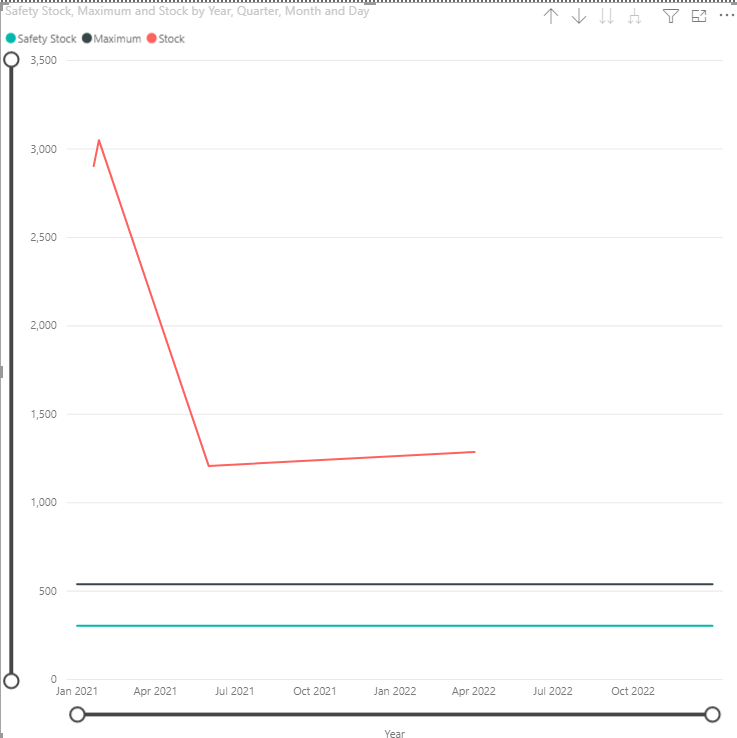
The problem with this code is that I want it to calculate the stock based on the previous day's calculation. This measure does not calculate stock on a daily basis, it only calculates on days where the stock is changing. Right now, my visual looks like this:
The desired outcome is to have the "Stock" line remain flat until a change in stock level happens. So rather than having the line gradually decreasing from jan-june 2021, the line should stay flat until june when a sale is forecasted to occur. On January 26, 2021, the value for stock is 3,050 and there are no other values for stock showing up until june 1, 2021 when it drops to
1208. I want to re-code the measure so that ever day between jan. 26 and june 1, the stock shows as 3,050. Any help would be greatly appreciated!