Get certified for free when you join Fabric Data Days 2026 and dive into Fabric, Power BI, SQL, AI, and other essential data skills.
Join nowTry your skills in the Power BI Dataviz World Championship! Round one ends June 26. Join now
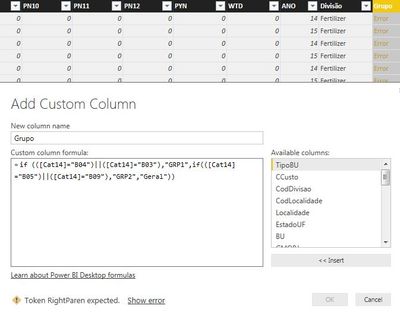
I'm trying to use the IF function with OR operation in custom formula for new column but I'm not sure about the correct syntax or rules to include this new logic.
If I use only the IF function its work well, but I would like to include OR syntax at the formula and returns the error message below:
Expression.Error: We cannot convert the value true to type Function.
Details:
Value=TRUE
Type=Type
I've already try to use double pipe symbol "||" , I tryed "OR", "IF OR"...
example:
if (([Cat14]="B04") || ([Cat14]="B03")) then "GRP1"
else if (([Cat14]="B05" ) || ( [Cat14]="B09")) then "GRP2"
else "Geral"
Anybody knows if is possible to use OR operation together with IF formula, or smth like that...?
Thanks
Marlon B.
Solved! Go to Solution.
The "or" has to be lower-case:
let
a = Table.FromColumns({{"B04", "B09", "B10"}}, {"Cat14"}),
b = Table.AddColumn(a, "Calc",
each if ([Cat14]="B04" or [Cat14]="B03") then "GRP1"
else if ([Cat14]="B05" or [Cat14]="B09") then "GRP2"
else "Geral")
in
b
The "or" has to be lower-case:
let
a = Table.FromColumns({{"B04", "B09", "B10"}}, {"Cat14"}),
b = Table.AddColumn(a, "Calc",
each if ([Cat14]="B04" or [Cat14]="B03") then "GRP1"
else if ([Cat14]="B05" or [Cat14]="B09") then "GRP2"
else "Geral")
in
b
if (([Cat14]="B04") || ([Cat14]="B03"), "GRP1", IF (([Cat14]="B05" ) || ( [Cat14]="B09"),"GRP2","Geral"))
I might have a paren mismatch somewhere
Not yet.
When I click "show error", it Hint the "||" symbol as possible error 😕
This formula works for you smoupre?
Many tks.
My bad, when you said "custom column", I was thinking that you were creating a custom column in Power BI Desktop once you already loaded the data so I gave you the DAX syntax. Looks like you wanted the "M" syntax. See @curth response for the M syntax.
Don't miss out on Data Days, June 15 through August 7. Learn Fabric, Power BI, SQL, AI and more.
Check out the May 2026 Power BI update to learn about new features.
| User | Count |
|---|---|
| 22 | |
| 21 | |
| 21 | |
| 20 | |
| 13 |
| User | Count |
|---|---|
| 59 | |
| 53 | |
| 41 | |
| 31 | |
| 26 |