Forum Discussion

Marlonrb
10 years agoFrequent Visitor
IF - OR Formula in Add Custom Column
I'm trying to use the IF function with OR operation in custom formula for new column but I'm not sure about the correct syntax or rules to include this new logic. If I use only the IF function it...
 10 years ago
The "or" has to be lower-case:
let
    a = Table.FromColumns({{"B04", "B09", "B10"}}, {"Cat14"}),
    b = Table.AddColumn(a, "Calc",
        each if ([Cat14]="B04" or [Cat14]="B03") then "GRP1"
        else if ([Cat14]="B05" or [Cat14]="B09") then "GRP2"
        else "Geral")
in
    b

Greg_Deckler
10 years agoCommunity Champion
if (([Cat14]="B04") || ([Cat14]="B03"), "GRP1", IF (([Cat14]="B05" ) || ( [Cat14]="B09"),"GRP2","Geral"))
I might have a paren mismatch somewhere

Marlonrb
10 years agoFrequent Visitor
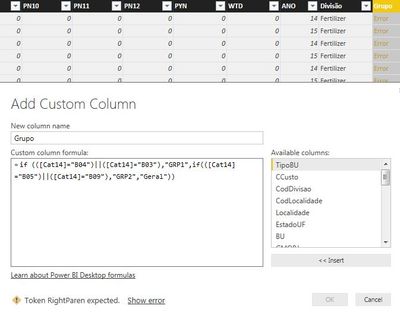
When I click "show error", it Hint the "||" symbol as possible error :\
This formula works for you smoupre?
Many tks.
- Greg_Deckler10 years agoCommunity Champion
My bad, when you said "custom column", I was thinking that you were creating a custom column in Power BI Desktop once you already loaded the data so I gave you the DAX syntax. Looks like you wanted the "M" syntax. See curth response for the M syntax.