Don't miss your chance to take exam DP-600 or DP-700 on us!
Request nowLearn from the best! Meet the four finalists headed to the FINALS of the Power BI Dataviz World Championships! Register now
I have a date table I created beginning with a specific date - 5/18/2018. I have it set up to populate a date entry for every date between that date and today so overtime dates will continue to get added (I used this DAX code: CALENDAR("5,18,2018",TODAY()) ) I now need to keep track of the number of weeks that have passed from 5/18/2018 to today each week and I need to be able to assign which week date falls under. This is to track how long a version of software has been in GR. Listed below is what I would like to achieve. I tried using WEEKNUM but that starts as of 1/1/2018. Does anyone know how to do this?
| Date | Weeks since GR |
| 5/18/2018 | 1 |
| 5/19/2018 | 1 |
| 5/20/2018 | 1 |
| 5/21/2018 | 1 |
| 5/22/2018 | 1 |
| 5/23/2018 | 1 |
| 5/24/2018 | 1 |
| 5/25/2018 | 2 |
| 5/26/2018 | 2 |
| 5/27/2018 | 2 |
| 5/28/2018 | 2 |
| 5/29/2018 | 2 |
| 5/30/2018 | 2 |
| 5/31/2018 | 2 |
You need to add a column which uses DATEDIFF function.
=DATEDIFF(date1, date2, weeks)
Basically provides the difference between the two dates in weeks.
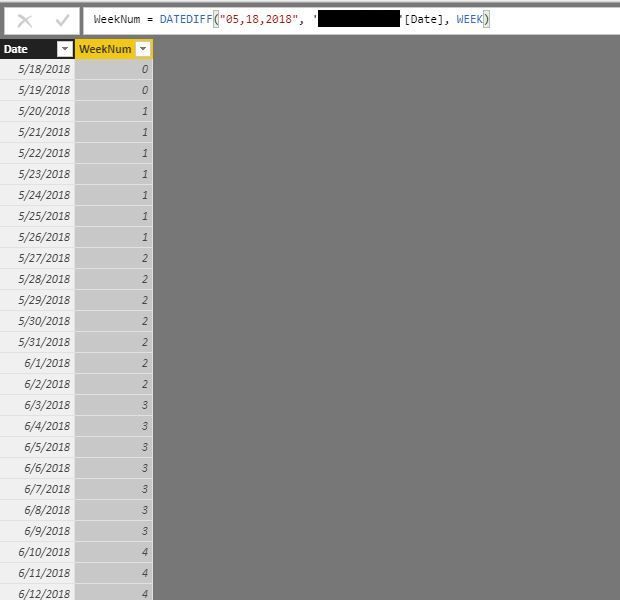
Sorry - I forgot mention that I tried that and this is what I get for that what is shown below. If I reverse it, I get negative values.
I see that it's calculating correctly. Or did you want something else? Can you provide what numbers you are expecting?
What I was looking to achieve is in my original post (scroll up). I actually just figured it out (see below) - I should have been using the start date instead of today().
Thanks!
@krfaughnan Please try with this...
Test08 = ADDCOLUMNS( CALENDAR("2018-05-18",TODAY()),
"WeekNo",IF(WEEKDAY([Date],2)>=5, WEEKNUM([Date],2)+1,WEEKNUM([Date],2))-20
) Proud to be a PBI Community Champion
| User | Count |
|---|---|
| 50 | |
| 40 | |
| 32 | |
| 14 | |
| 13 |
| User | Count |
|---|---|
| 87 | |
| 73 | |
| 37 | |
| 28 | |
| 26 |