Don't miss your chance to take the Fabric Data Engineer (DP-600) exam for FREE! Find out how by attending the DP-600 session on April 23rd (pacific time), live or on-demand.
Learn moreNext up in the FabCon + SQLCon recap series: The roadmap for Microsoft SQL and Maximizing Developer experiences in Fabric. All sessions are available on-demand after the live show. Register now
Hi All
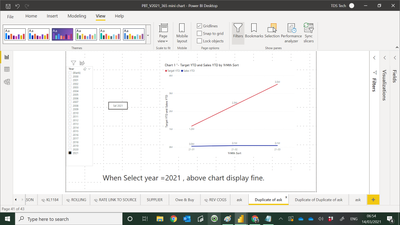
Below screen shot shown the chart display well when i select year =2021.
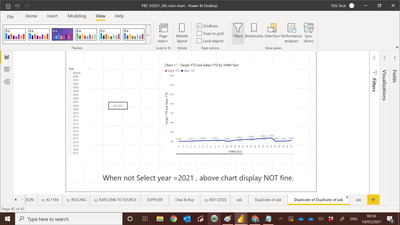
When i don't select Year =2021 , the chart dont display well.
My PBI file :-
Paul
Solved! Go to Solution.
Hi @admin11
When you don't select the year, then all the years are selected by default.
What this means is that your data is now presented for 21 years and 12 months and 3 months from 2021 as per your chart. This is the reason why you see the scroll bar at the bottom.
Slide it to the right and you will see the 2021 year 3 months displayed and the red "target YTD" line.
Hi @admin11
When you don't select the year, then all the years are selected by default.
What this means is that your data is now presented for 21 years and 12 months and 3 months from 2021 as per your chart. This is the reason why you see the scroll bar at the bottom.
Slide it to the right and you will see the 2021 year 3 months displayed and the red "target YTD" line.
@Anonymous
You are very sharp.
Thank you for spot that. it help me.
Paul
Hi Paul,
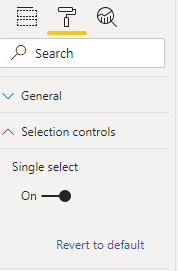
A work arround could be to turn on the Single select of that Year slicer
Regards
Amine Jerbi
If I answered your question, please mark this thread as accepted
and you can follow me on
My Website, LinkedIn and Facebook
Thank you for sharing
may be due to my question not clear
what I want to remove initial select button for thid Tab
meaning user don't need to click on Year = 2021 in order to see the chart.
That's why you need to turn on single select of the slicer on year 2021...have you tried it!
Regards
Amine Jerbi
If I answered your question, please mark this thread as accepted
and you can follow me on
My Website, LinkedIn and Facebook
If you have recently started exploring Fabric, we'd love to hear how it's going. Your feedback can help with product improvements.
A new Power BI DataViz World Championship is coming this June! Don't miss out on submitting your entry.
Share feedback directly with Fabric product managers, participate in targeted research studies and influence the Fabric roadmap.
| User | Count |
|---|---|
| 44 | |
| 43 | |
| 38 | |
| 18 | |
| 16 |
| User | Count |
|---|---|
| 67 | |
| 63 | |
| 30 | |
| 30 | |
| 23 |