cancel
Showing results for 
Search instead for 
Did you mean: 

Data Days is here! Join us now for 60+ days of learning, challenges, and connection. Learn more

Reply
admin11
Memorable Member
Memorable Member

How to make my chart still can display well when i don't select Year=2021 ?

Hi All

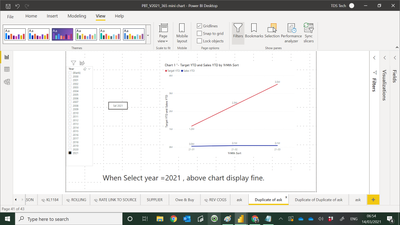
Below screen shot shown the chart display well when i select year =2021.

admin11_0-1615676103080.png

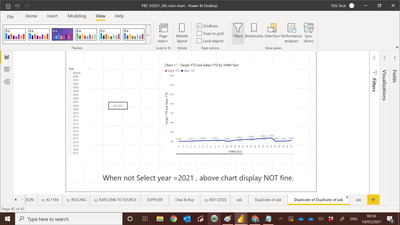
When i don't select Year =2021 , the chart dont display well.

admin11_1-1615676182366.png

My PBI file :-

https://www.dropbox.com/s/48xg9x4j592yrl9/PBT_V2021_365%20How%20to%20make%20target%20chart%20can%20d...


Paul

1 ACCEPTED SOLUTION
Anonymous
Not applicable

Hi @admin11 

When you don't select the year, then all the years are selected by default.

What this means is that your data is now presented for 21 years and 12 months and 3 months from 2021 as per your chart. This is the reason why you see the scroll bar at the bottom.

Slide it to the right and you will see the 2021 year 3 months displayed and the red "target YTD" line.

View solution in original post

5 REPLIES 5
Anonymous
Not applicable

Hi @admin11 

When you don't select the year, then all the years are selected by default.

What this means is that your data is now presented for 21 years and 12 months and 3 months from 2021 as per your chart. This is the reason why you see the scroll bar at the bottom.

Slide it to the right and you will see the 2021 year 3 months displayed and the red "target YTD" line.

@Anonymous 

You are very sharp.

Thank you for spot that. it help me.

Paul


aj1973
Community Champion
Community Champion

Hi Paul,

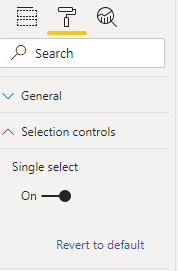
A work arround could be to turn on the Single select of that Year slicer 

aj1973_0-1615681087581.png


Regards
Amine Jerbi

If I answered your question, please mark this thread as accepted
and you can follow me on
My Website, LinkedIn and Facebook

@aj1973 

Thank you for sharing 

may be due to my question not clear 

what I want to remove initial select button for thid Tab

meaning user don't need to click on Year = 2021 in order to see the chart.

aj1973
Community Champion
Community Champion

That's why you need to turn on single select of the slicer on year 2021...have you tried it!

Regards
Amine Jerbi

If I answered your question, please mark this thread as accepted
and you can follow me on
My Website, LinkedIn and Facebook

Helpful resources

Announcements
Fabric Data Days is here Carousel

Fabric Data Days 2026

Don't miss out on Data Days, June 15 through August 7. Learn Fabric, Power BI, SQL, AI and more.

May Power BI Update Carousel

Power BI Monthly Update - May 2026

Check out the May 2026 Power BI update to learn about new features.

Power BI DataViz World Championships carousel

Power BI DataViz World Championships - June 2026

A new Power BI DataViz World Championship is coming this June! Don't miss out on submitting your entry.