Don't miss your chance to take the Fabric Data Engineer (DP-600) exam for FREE! Find out how by attending the DP-600 session on April 23rd (pacific time), live or on-demand.
Learn moreNext up in the FabCon + SQLCon recap series: The roadmap for Microsoft SQL and Maximizing Developer experiences in Fabric. All sessions are available on-demand after the live show. Register now
Hello guys,
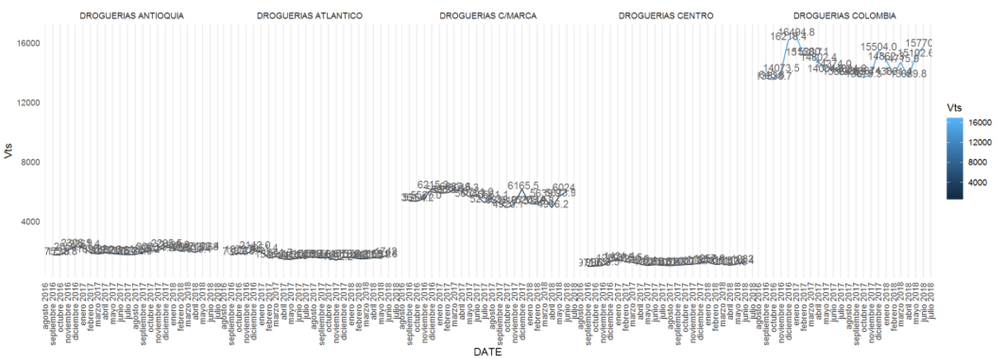
Anyone knows how can I add an horizontal scroll bar to an R visualization, the x axis has a lot of values and the chart gets unreadible, I'm using ggplot btw.
@SebastianLM,
Based on my research, it is not possible to add scrollbar when using ggplot as ggplot is designed to make static images you can print.
For creating interactive graphics or scrollbar, you can use plotly. There is a similar blog for your reference.
https://powerbi.microsoft.com/en-us/blog/interactive-r-custom-visuals-support-is-here/
Regards,
Lydia
Cool! I'll take a look and let you know how it goes.
Thanks.
If you have recently started exploring Fabric, we'd love to hear how it's going. Your feedback can help with product improvements.
A new Power BI DataViz World Championship is coming this June! Don't miss out on submitting your entry.
Experience the highlights from FabCon & SQLCon, available live and on-demand starting April 14th.
| User | Count |
|---|---|
| 48 | |
| 40 | |
| 37 | |
| 20 | |
| 16 |
| User | Count |
|---|---|
| 70 | |
| 67 | |
| 32 | |
| 27 | |
| 25 |