cancel
Showing results for 
Search instead for 
Did you mean: 

Next up in the FabCon + SQLCon recap series: The roadmap for Microsoft SQL and Maximizing Developer experiences in Fabric. All sessions are available on-demand after the live show. Register now

Reply
danielllin
Helper I
Helper I

Highlight dot dynamically

Hi,

擷取.PNG
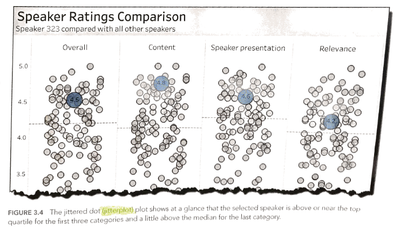
This picture is from "The big book of dashboards", and this concepts is very useful in my company's scenario,
but i can't use PowerBI to acheieve it.
What i what to do is:
when i filter some conditions, if data is in the conditions, then the dot is blue, but others are gray,
so it can show me where is the dot and i can compare it with others easily. 
(If not only single dots are in the conditions, then highlight those dots)
Can anyone teach me how to do it? 
 
Thanks in advance!

1 ACCEPTED SOLUTION
sturlaws
Resident Rockstar
Resident Rockstar

Hi @danielllin,


not quite sure if I understand the image you shared 100%, but the in the default scatter plot of Power BI there is an option of semi-dynamically setting the color of dots via Formatting -> Data colors -> Advanced controls -> setting the appropriate rules. 

Take a look at the documentation provided by Microsoft


Making use of the cross-filtering and highlighting capabilities of Power BI may also be worth exploring for you.


If you can provide specific requirements of what you need, as well as some example data(or subset of real data), I'll be happy to help you.


best regards,

Sturla

View solution in original post

2 REPLIES 2
sturlaws
Resident Rockstar
Resident Rockstar

Hi @danielllin,


not quite sure if I understand the image you shared 100%, but the in the default scatter plot of Power BI there is an option of semi-dynamically setting the color of dots via Formatting -> Data colors -> Advanced controls -> setting the appropriate rules. 

Take a look at the documentation provided by Microsoft


Making use of the cross-filtering and highlighting capabilities of Power BI may also be worth exploring for you.


If you can provide specific requirements of what you need, as well as some example data(or subset of real data), I'll be happy to help you.


best regards,

Sturla

Hi Sturla,


Thanks, it works!! I use this way to acheieve it!


Formatting -> Data colors -> Advanced controls -> field value


Helpful resources

Announcements
New to Fabric survey Carousel

New to Fabric Survey

If you have recently started exploring Fabric, we'd love to hear how it's going. Your feedback can help with product improvements.

Power BI DataViz World Championships carousel

Power BI DataViz World Championships - June 2026

A new Power BI DataViz World Championship is coming this June! Don't miss out on submitting your entry.

Join our Fabric User Panel

Join our Fabric User Panel

Share feedback directly with Fabric product managers, participate in targeted research studies and influence the Fabric roadmap.

March Power BI Update Carousel

Power BI Community Update - March 2026

Check out the March 2026 Power BI update to learn about new features.