This is best Fabric, Power BI, SQL and AI community event. How do we know? The last event sold out! Save €200 with code FABCMTY200.
Register nowA new Data Days event is coming soon! This time we’re going bigger than ever. Fabric, Power BI, SQL, AI and more. Don't miss out.
Hi,
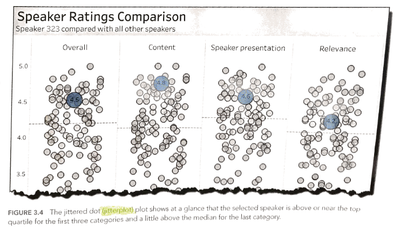
This picture is from "The big book of dashboards", and this concepts is very useful in my company's scenario,
but i can't use PowerBI to acheieve it.
What i what to do is:
when i filter some conditions, if data is in the conditions, then the dot is blue, but others are gray,
so it can show me where is the dot and i can compare it with others easily.
(If not only single dots are in the conditions, then highlight those dots)
Can anyone teach me how to do it?
Thanks in advance!
Solved! Go to Solution.
Hi @danielllin,
not quite sure if I understand the image you shared 100%, but the in the default scatter plot of Power BI there is an option of semi-dynamically setting the color of dots via Formatting -> Data colors -> Advanced controls -> setting the appropriate rules.
Take a look at the documentation provided by Microsoft
Making use of the cross-filtering and highlighting capabilities of Power BI may also be worth exploring for you.
If you can provide specific requirements of what you need, as well as some example data(or subset of real data), I'll be happy to help you.
best regards,
Sturla
Hi @danielllin,
not quite sure if I understand the image you shared 100%, but the in the default scatter plot of Power BI there is an option of semi-dynamically setting the color of dots via Formatting -> Data colors -> Advanced controls -> setting the appropriate rules.
Take a look at the documentation provided by Microsoft
Making use of the cross-filtering and highlighting capabilities of Power BI may also be worth exploring for you.
If you can provide specific requirements of what you need, as well as some example data(or subset of real data), I'll be happy to help you.
best regards,
Sturla
Hi Sturla,
Thanks, it works!! I use this way to acheieve it!
Formatting -> Data colors -> Advanced controls -> field value
Check out the May 2026 Power BI update to learn about new features.
Sign up to receive a private message when registration opens and key events begin.
If you have recently started exploring Fabric, we'd love to hear how it's going. Your feedback can help with product improvements.
| User | Count |
|---|---|
| 31 | |
| 26 | |
| 23 | |
| 22 | |
| 13 |
| User | Count |
|---|---|
| 62 | |
| 47 | |
| 27 | |
| 23 | |
| 19 |